Canonical update (2026-08-29): This article is a field note. The current consolidated story is Agentic data collection and warehousing.
This started as a deceptively simple request: install the right Google analytics tooling, audit the existing implementation, make the dataLayer genuinely rich, make consent behave properly, and then push the whole stack all the way through to warehousing and reporting.
Editor's note, 1 April 2026: this post documents the server-side tagging architecture that was live in March 2026. The current production site has since been simplified back to client-side GTM and GA4 only, and the Cloud Run tagging services have been retired.
The historical result described here is not just "GA4 installed." It is a complete measurement system:
- a site-owned, typed analytics contract
- a persistent consent manager
- first-party GTM delivery from
https://rajeevg.com/metrics - a rebuilt web GTM container
- a rebuilt server-side GTM container on Cloud Run
- a live GA4 property with promoted custom definitions
- a BigQuery export link
- a usable Looker Studio reporting surface
- a documented audit trail with production proof
This post is the long version of how that was done.
The short version
Web container
GTM-K2VRQS47
Clean web GTM rebuild, published live, pointing at the first-party server endpoint.
Server container
GTM-W4GKTR3H
Server-side GTM running on Cloud Run and serving collection through /metrics.
GA4 property
498363924
Promoted custom dimensions and metrics for the app-owned event schema.
Warehouse
personal-gws-1:analytics_498363924
BigQuery export linked to the live stream, ready for warehouse-side analysis and QA.
If you want the implementation source of truth, the canonical repo docs are:
What the site now measures
The most important design choice was that the application, not GTM, owns the measurement vocabulary.
That means every event carries stable context such as:
browser_session_idpage_view_idpage_view_sequence- page metadata like
page_type,site_section,content_id,content_tags - device and viewport state
- referrer classification
- current consent state
- interaction-specific metadata like
selected_tags,search_term,destination,interaction_sequence, and engagement summaries
This was the opposite of a thin "just fire page_view and click" implementation. The site now emits a stream that is useful in GA4 reports, clean to relay via server-side GTM, and structured enough to make sense in BigQuery later.
The architecture
flowchart TB
  Browser["Visitor browser"] --> Consent["In-app consent manager"]
  Consent --> DataLayer["App-owned dataLayer"]
  DataLayer --> WebGTM["Web GTM<br/>GTM-K2VRQS47"]
  WebGTM --> Metrics["First-party transport<br/>/metrics"]
  Metrics --> SGTM["Server-side GTM<br/>GTM-W4GKTR3H"]
  SGTM --> GA4["GA4 property<br/>498363924"]
  GA4 --> BQ["BigQuery export<br/>analytics_498363924"]
  GA4 --> Looker["Looker Studio report"]
The critical improvement here is the first-party transport layer. The browser loads GTM from rajeevg.com, not from Google as the primary script origin, and collection is sent to the same first-party path before being relayed by server-side GTM.
The sequence of the work
This was not a one-shot setup. It unfolded in phases.
| Phase | Goal | Main outcome |
|---|---|---|
| 1 | Make the site instrumentation worth preserving | Rich app-owned dataLayer contract |
| 2 | Make consent explicit and durable | In-app consent manager plus Consent Mode propagation |
| 3 | Move collection to a first-party path | /metrics transport wired through Next.js rewrites |
| 4 | Rebuild GTM rather than patching a messy legacy workspace | Clean web and server containers published live |
| 5 | Promote event parameters into reporting surfaces | GA4 custom dimensions and metrics created |
| 6 | Link warehousing and reporting | BigQuery link and Looker Studio report |
| 7 | Prove the result in production | Browser evidence, network proof, and docs |
The agent path changed by phase rather than using one tool for everything:
| Phase | Agent tools used | Why they mattered |
|---|---|---|
| App instrumentation | repo-local shell, rg, apply_patch, pnpm | Best for reading the existing Next.js codebase, editing the event contract, and validating the app directly |
| Google admin work | Chrome DevTools MCP, logged-in Chrome, GTM MCP | Needed because the work depended on the already authenticated Google sessions and live GTM/GA interfaces |
| Cloud and warehouse checks | gcloud, bq, analytics MCP | Best for proving the server container, project, and dataset state from system-of-record outputs |
| Final proof | Playwright, curl, Vercel CLI | Needed repeatable production checks for consent behavior, network transport, and deployment state |
Phase 1: rebuild the dataLayer first
Before touching the Google admin surfaces, the site had to become explicit about what it meant by a page, a click, a section view, a search interaction, and an engaged session.
The heart of that is src/lib/analytics.ts.
export function getPageAnalyticsContext(pathname = window.location.pathname): AnalyticsPayload {
  const pageTitle = document.title.replace(/\s+[|•-]\s+.*$/, "").trim() || document.title
  const heading = document.querySelector("main h1")
  const contentSlug = getContentSlug(pathname)
  const routeDepth = pathname.split("/").filter(Boolean).length

  return compactPayload({
    page_title: pageTitle,
    page_path: pathname,
    page_location: window.location.href,
    page_type: getPageType(pathname),
    site_section: getSiteSection(pathname),
    route_depth: routeDepth,
    content_slug: contentSlug,
    content_title: sanitizeAnalyticsText(heading?.textContent),
    query_string: window.location.search || undefined,
    ...getReferrerContext(),
    ...getPageMetadataAttributes(),
  })
}
A few things are worth calling out here:
- page metadata is derived centrally, so event producers do not all invent their own page naming
- page roots can declare
data-analytics-page-*metadata and have it automatically merged into all events - context is captured once and shared, rather than reassembled ad hoc in every component
That shared contract then feeds every event push:
export function pushDataLayerEvent(
  event: string,
  payload: AnalyticsPayload = {},
  options: AnalyticsEventOptions = {}
) {
  if (typeof window === "undefined") return

  const defaultContext = {
    ...getRuntimeAnalyticsContext(),
    ...getPageAnalyticsContext(),
  }

  const eventPayload = compactPayload({
    event,
    event_source: "site_app",
    event_timestamp: new Date().toISOString(),
    ...defaultContext,
    ...options.context,
    ...payload,
  })

  window.dataLayer = window.dataLayer || []
  window.dataLayer.push(eventPayload)
}
This is the point where the implementation moved from "Google tags on a website" to "a site with a real analytics domain model."
Phase 2: make consent a real state machine
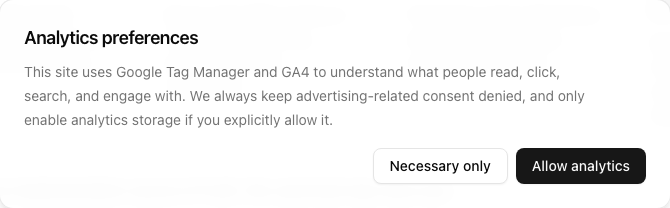
The second major shift was that consent could not be treated as an afterthought. It needed:
- default denied analytics storage
- always-denied ad consent
- persistent visitor choice
- rehydration on return visits
- explicit eventing when preferences change
The consent model lives in src/lib/consent.ts.
export function createConsentState(options: {
  analyticsStorage: ConsentChoice
  source: ConsentSource
  updatedAt?: string
}): ConsentState {
  return {
    analytics_storage: options.analyticsStorage,
    ad_storage: "denied",
    ad_user_data: "denied",
    ad_personalization: "denied",
    functionality_storage: "granted",
    security_storage: "granted",
    updated_at: options.updatedAt ?? new Date().toISOString(),
    source: options.source,
  }
}
And the UI plus Google propagation sits in src/components/consent-manager.tsx:
const updateConsent = (analyticsStorage: ConsentChoice, source: ConsentSource) => {
  const nextConsentState = createConsentState({ analyticsStorage, source })

  persistConsentState(nextConsentState)
  applyGoogleConsentState(nextConsentState)
  setConsentState(nextConsentState)
  setIsBannerOpen(false)

  pushDataLayerEvent("consent_state_updated", {
    consent_source: source,
    consent_preference: analyticsStorage,
    consent_updated_at: nextConsentState.updated_at,
  })
}
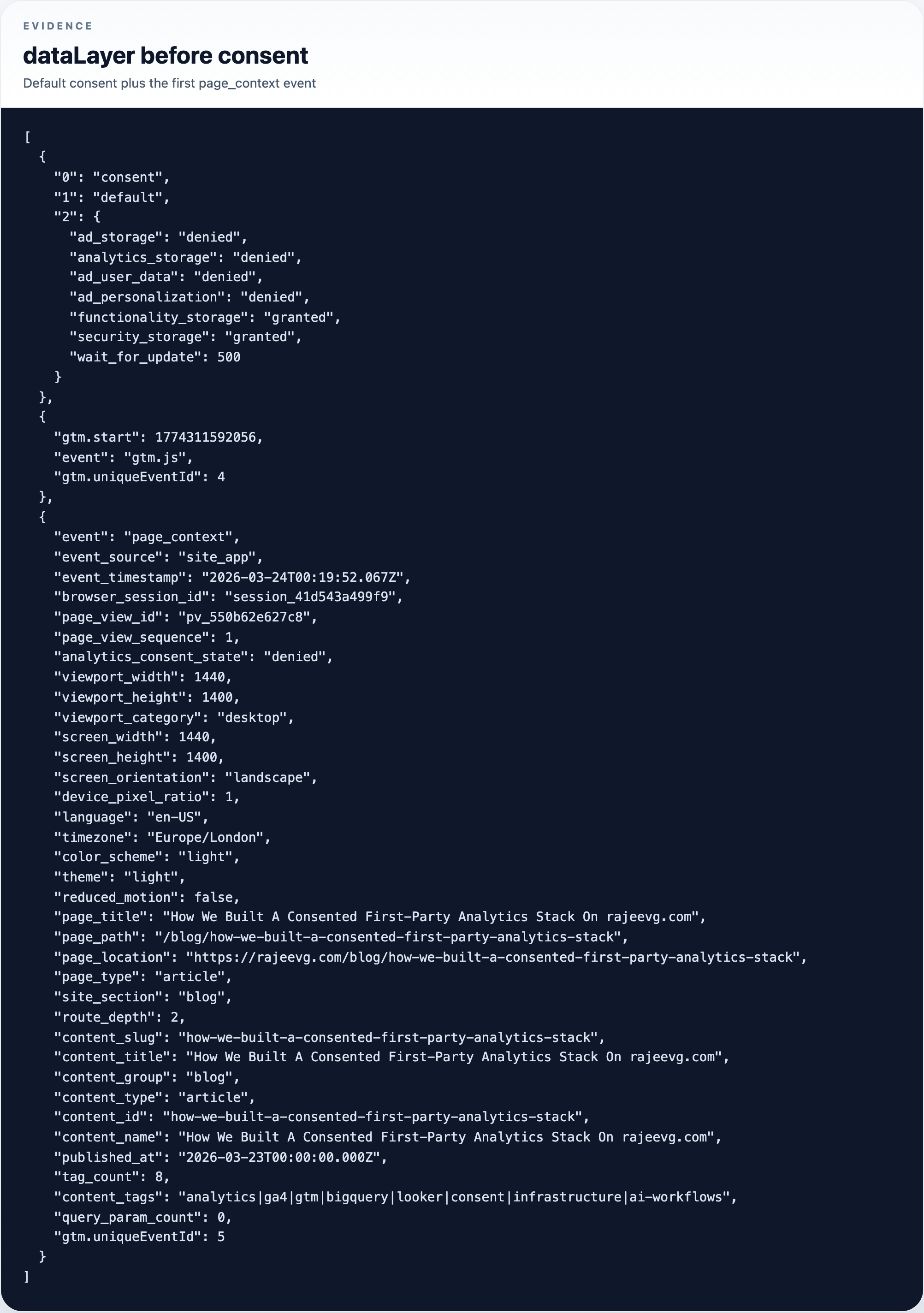
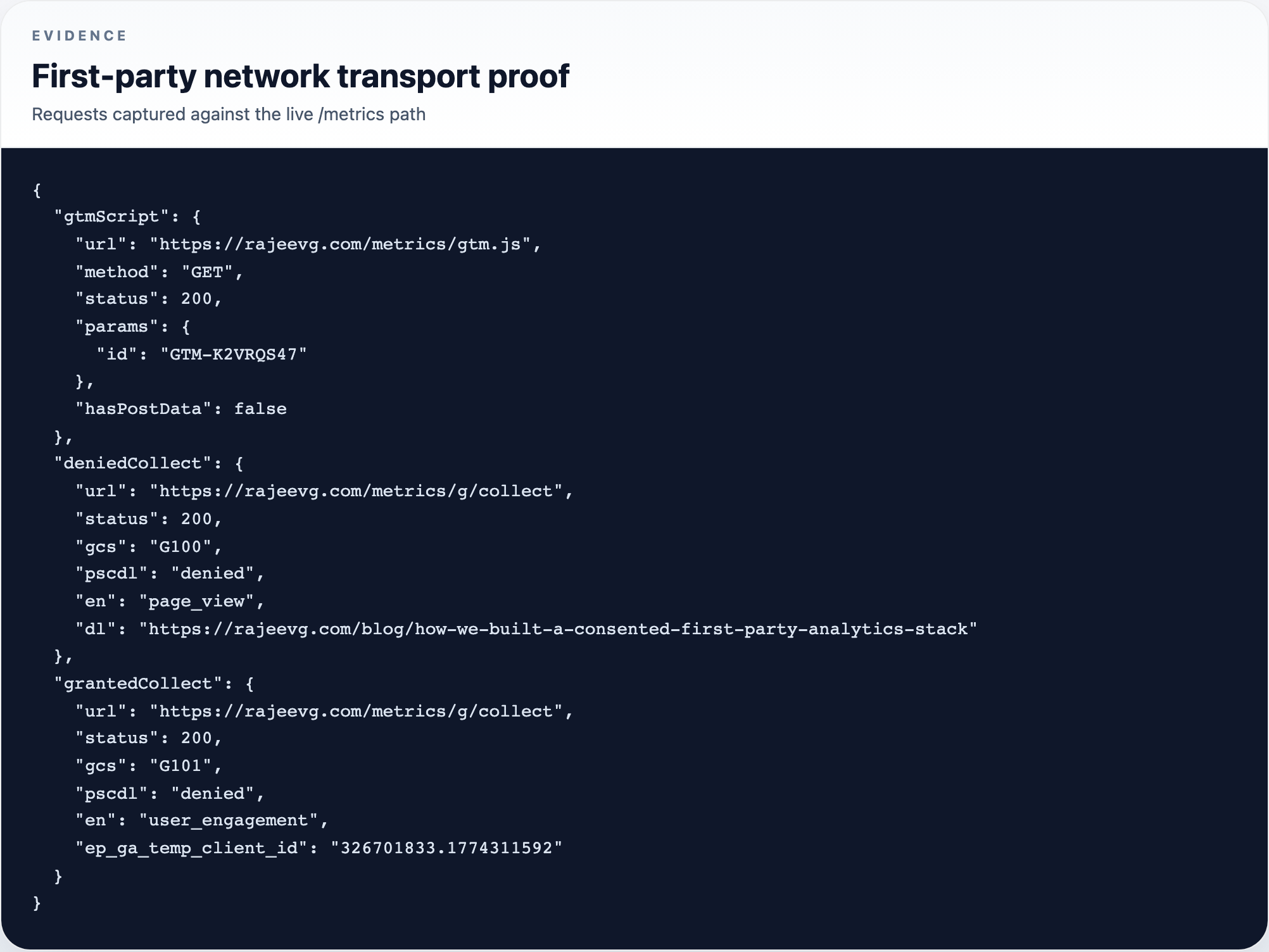
The important nuance is that this is consent-aware tracking, not absolute zero-network tracking. Because GTM loads with Consent Mode defaults set to denied, Google can still send cookieless pings before analytics storage is granted.
That matters enough to say plainly:
This setup respects storage consent, but it still allows Consent Mode v2 style modeled measurement traffic before analytics storage is granted.
Consent
The live consent gate on the site
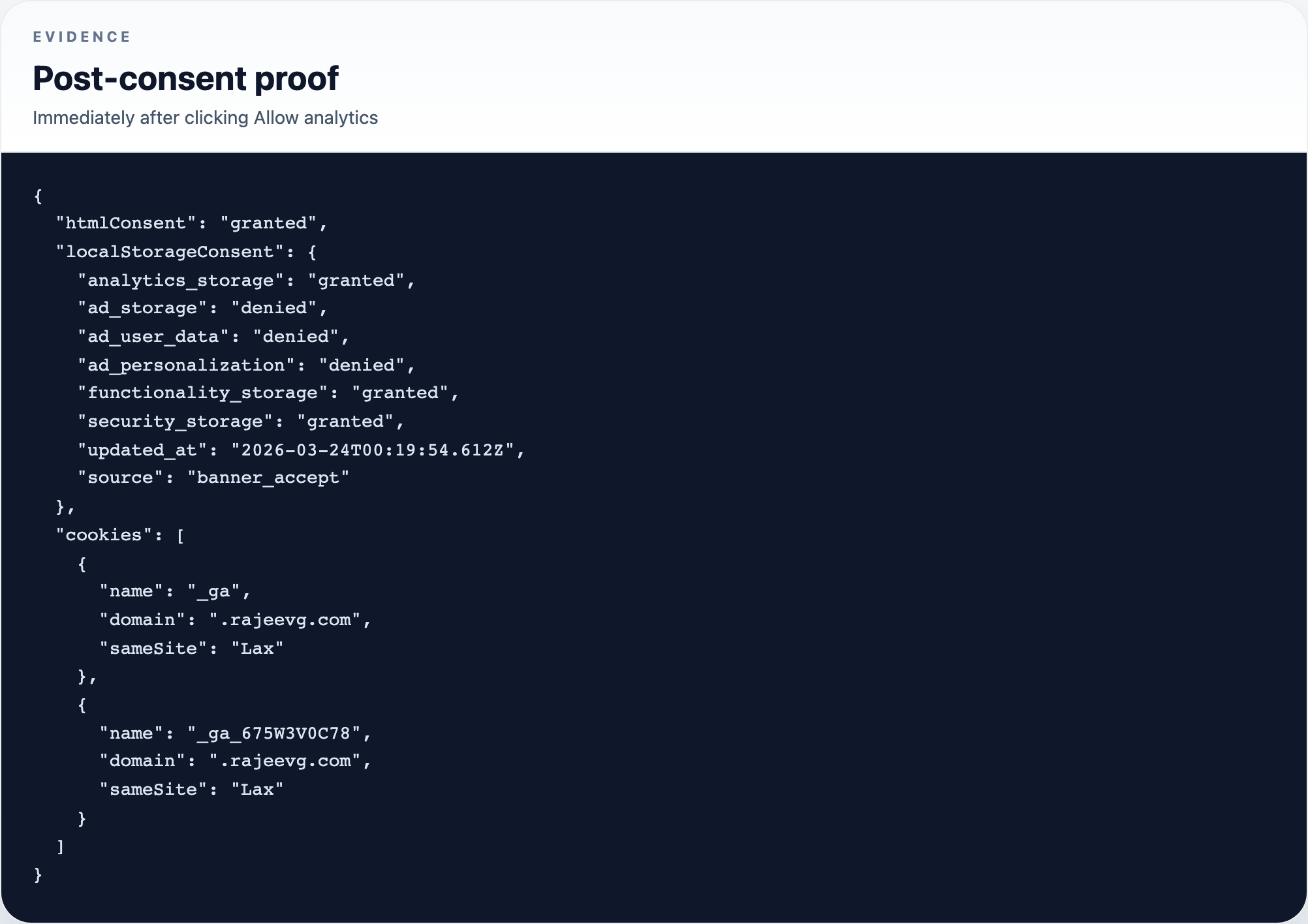
Proof
What changed after explicit consent
Phase 3: first-party GTM delivery through /metrics
The next architectural decision was to stop treating Google-hosted GTM as the primary delivery path.
Instead, the site now injects GTM from a configurable origin and rewrites a first-party path to the live server container.
The bootstrap lives in src/components/tag-manager-script.tsx:
export function TagManagerScript({ gtmId, scriptOrigin }: TagManagerScriptProps) {
  const normalizedOrigin = normalizeScriptOrigin(scriptOrigin)

  return (
    <>
      <Script id="google-tag-manager" strategy="afterInteractive">
        {`
          (function(w,d,s,l,i,u){
            w[l]=w[l]||[];
            w[l].push({'gtm.start': new Date().getTime(), event:'gtm.js'});
            var f=d.getElementsByTagName(s)[0],
              j=d.createElement(s),
              dl=l!='dataLayer'?'&l='+l:'';
            j.async=true;
            j.src=u + '/gtm.js?id=' + i + dl;
            f.parentNode.insertBefore(j,f);
          })(window,document,'script','dataLayer',${JSON.stringify(gtmId)},${JSON.stringify(normalizedOrigin)});
        `}
      </Script>
    </>
  )
}
And the first-party relay is wired in next.config.ts:
async rewrites() {
  const sgtmUpstreamOrigin = process.env.SGTM_UPSTREAM_ORIGIN

  if (!sgtmUpstreamOrigin) {
    return []
  }

  return [
    {
      source: "/metrics/:path*",
      destination: `${upstreamOrigin}/:path*`,
    },
  ]
}
That gives the site a stable endpoint:
- GTM script delivery:
https://rajeevg.com/metrics/gtm.js?id=GTM-K2VRQS47 - GA4 collection relay:
https://rajeevg.com/metrics/g/collect
That is the "first-party" part in concrete terms.
Phase 4: rebuild GTM instead of extending the old mess
One of the most important judgment calls in this whole session had nothing to do with code. The existing GTM workspace looked untrustworthy: paused items, contamination from older tags, and enough warning noise that it was not a good foundation for a clean server-side setup.
So the decision was not to keep patching the old container. The decision was to rebuild on clean containers.
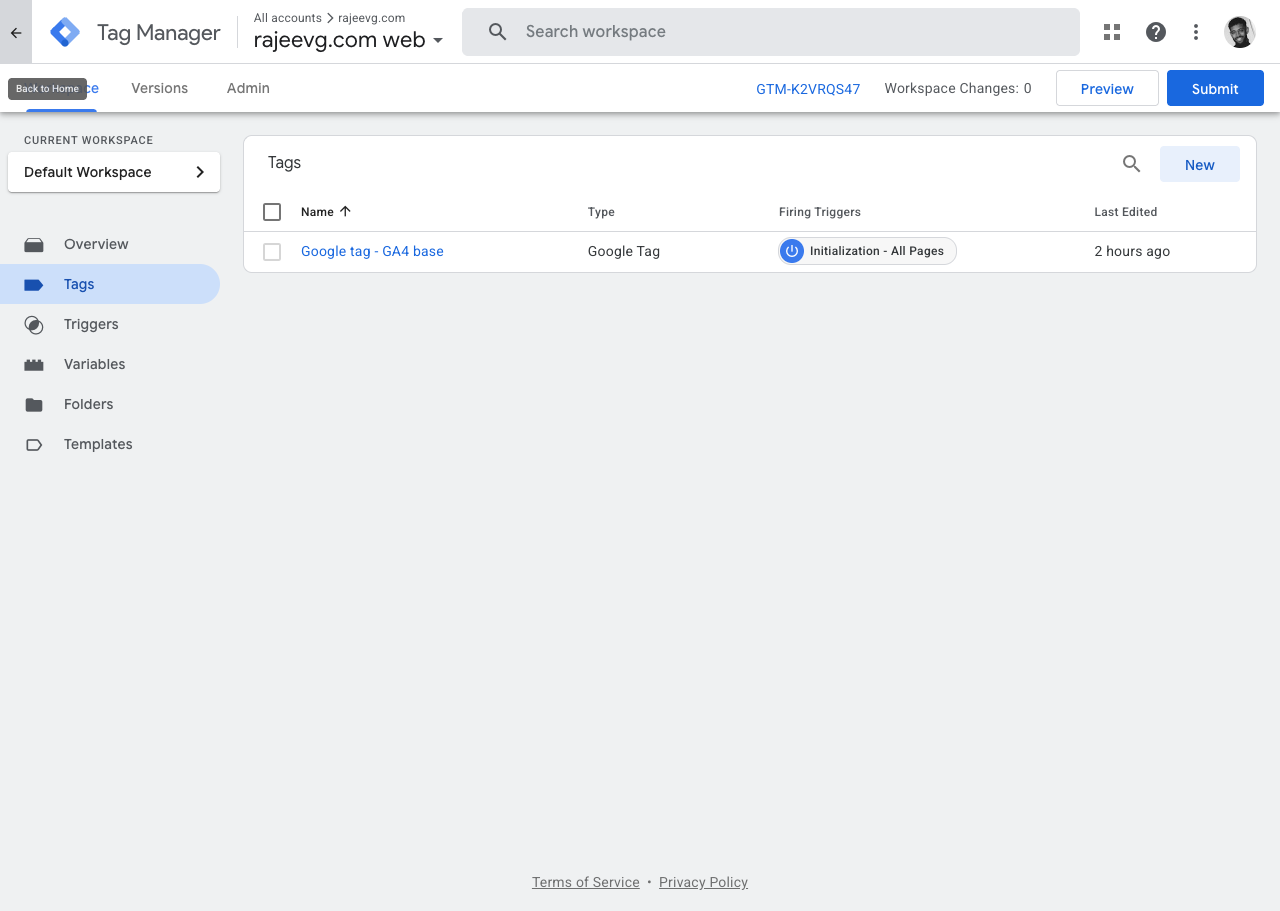
Live web GTM
Web GTM
A deliberately lean web GTM workspace
Live server-side GTM
Server GTM
Published server-side GTM versions are a better proof surface than the empty workspace
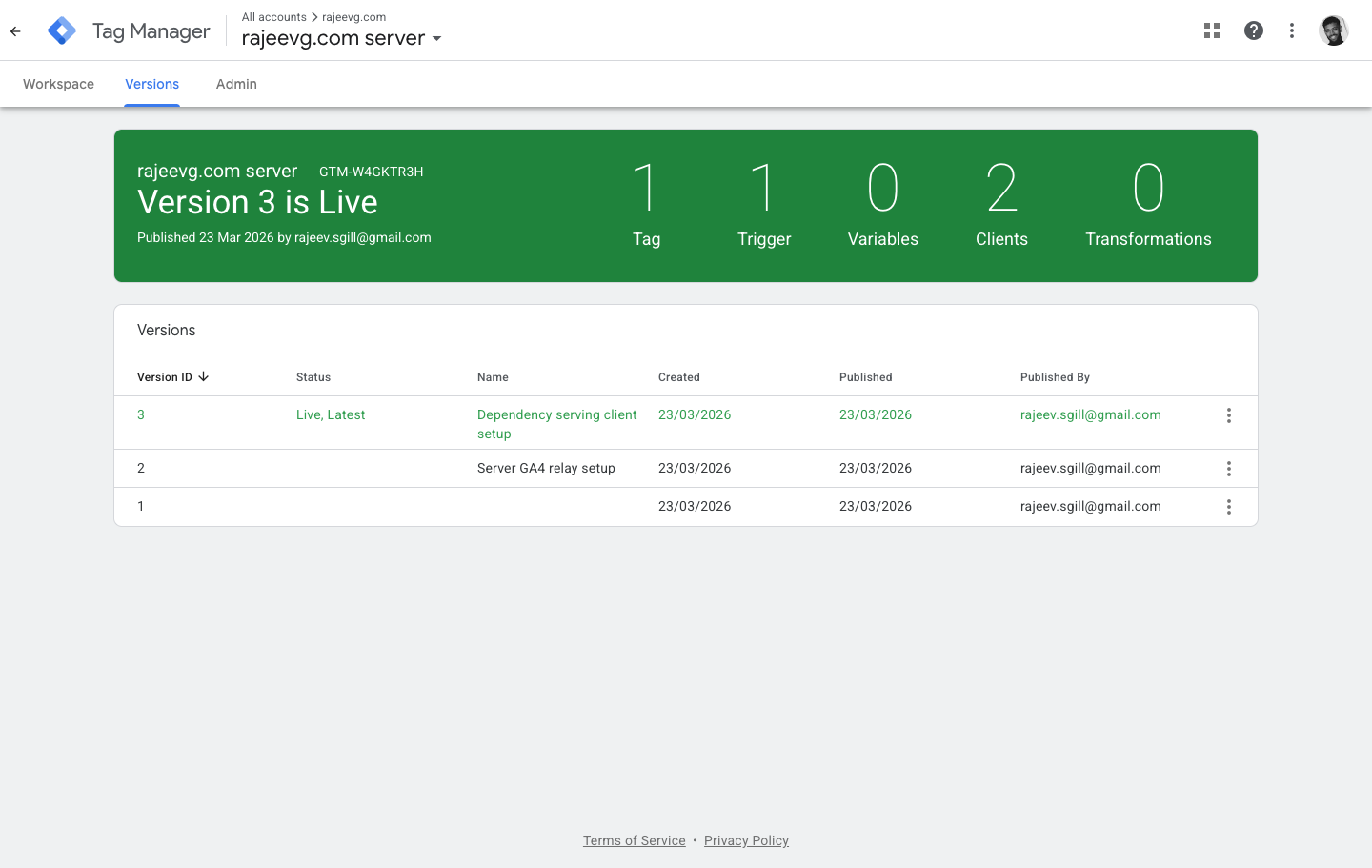
The server container proof that mattered most in practice came from three places together:
- the live GTM versions history
- the Cloud Run runtime
- the first-party
/metricsrequests captured from the browser
This is one of the quiet but high-leverage moves in the implementation. It makes the browser transport cleaner, gives more control over collection, and lays groundwork for later transformations, filtering, or enrichment.
Proof that it actually behaved correctly
This part matters. It is easy to write a nice narrative about analytics infrastructure. It is harder, and much more useful, to prove what the browser actually did in a fresh session.
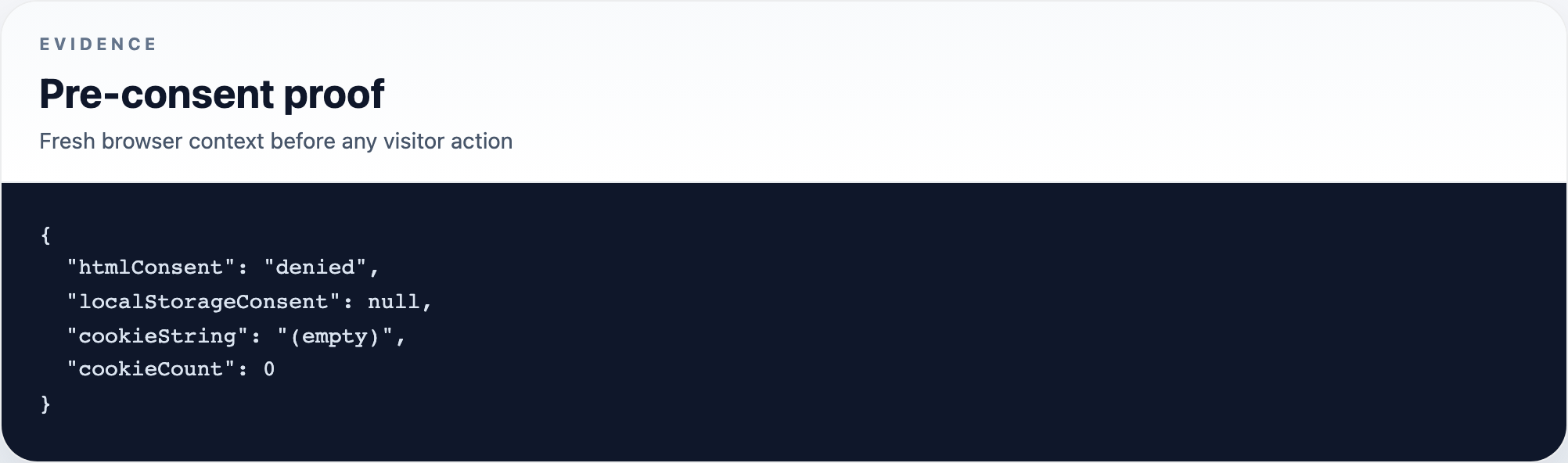
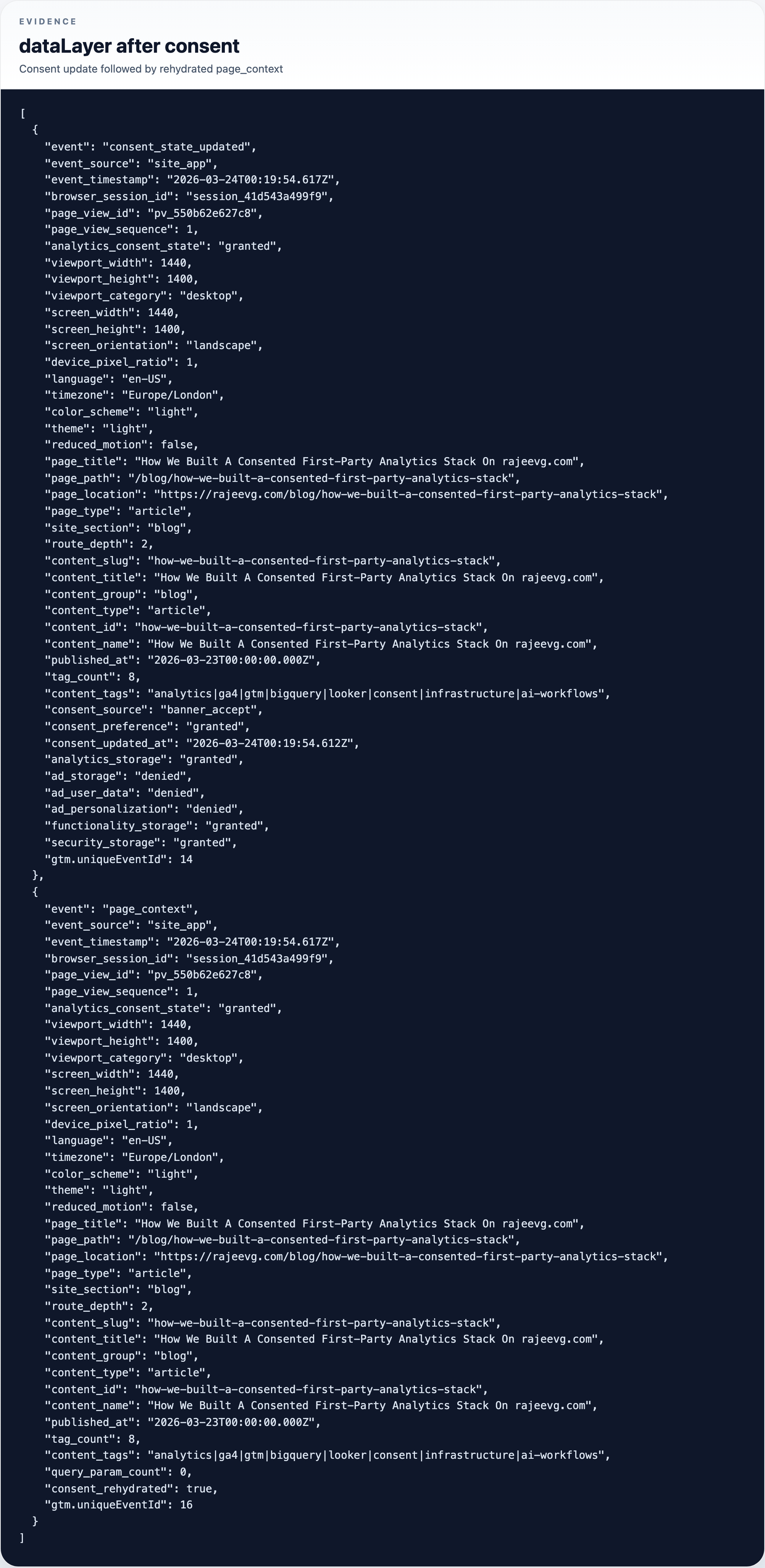
For this pass the evidence was captured against the live production article URL in a clean Playwright context, then cross-checked against the app-owned dataLayer and the first-party /metrics requests.
Evidence
Before consent
Evidence
After consent
Evidence
The dataLayer before consent
Evidence
The dataLayer after consent
Evidence
First-party transport proof
That evidence came from a saved proof artifact:
The most important takeaways from the proof run were:
- before consent, there were no GA cookies and no stored consent object
- before consent, the app still emitted a denied-state
page_contextevent - after consent, the app persisted a granted consent object and wrote the expected
_gacookies - the first-party
/metricstransport worked for both GTM delivery and GA collection - the browser-side event stream visibly recorded the consent transition instead of hiding it inside GTM
Phase 5: promote the schema into GA4 reporting
Getting events into GA4 is only half the story. If the event parameters stay unpromoted, the nicest dataLayer in the world still feels second-class inside GA reporting.
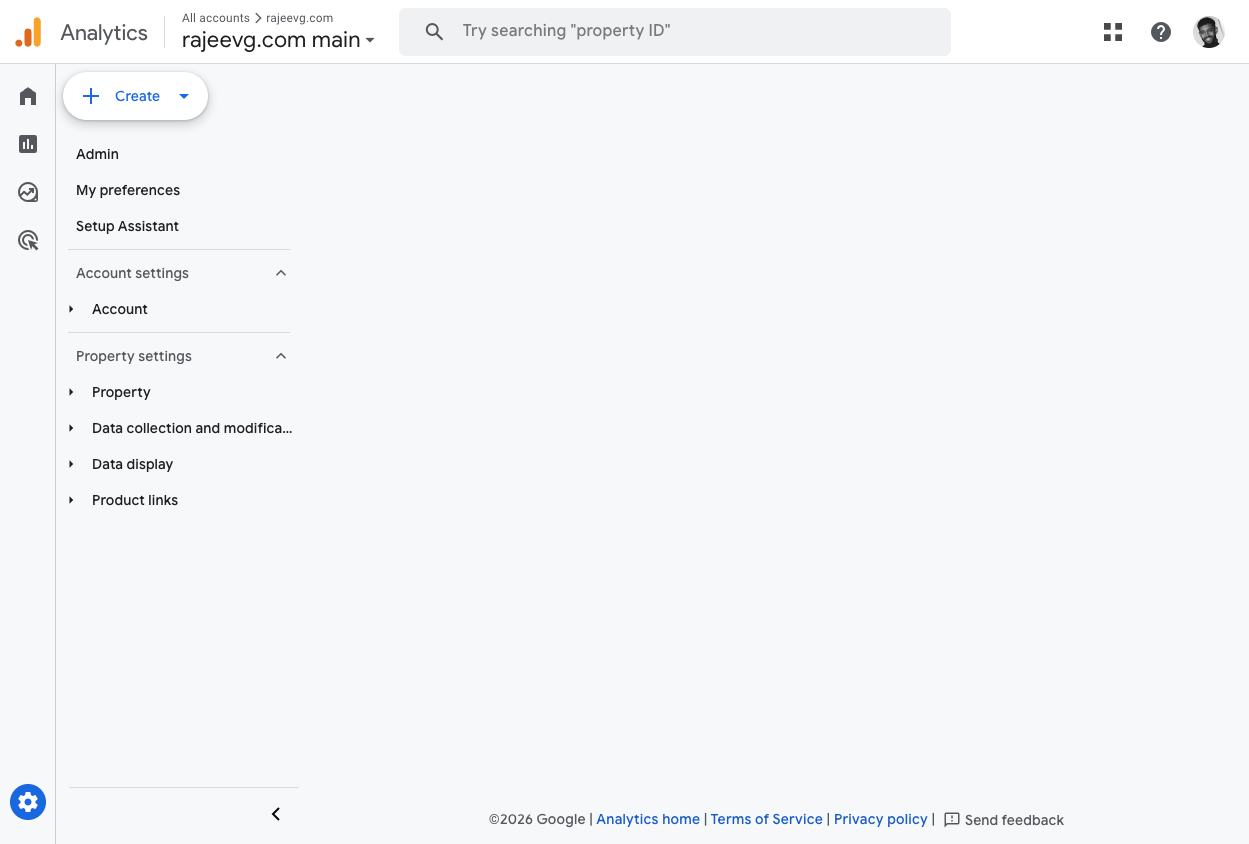
So the site event vocabulary was promoted into GA4 custom definitions.
At the time of the original site rollout, that meant 17 custom dimensions and 14 custom metrics for the main site event model. The live property has since grown beyond that baseline as newer app-specific fields were added.
That includes dimensions like:
page_typesite_sectioncontent_groupcontent_typecontent_idcontent_tagsviewport_categoryanalytics_consent_stateselected_tagssearch_term
And metrics like:
route_depthquery_param_countinteraction_sequenceengaged_seconds_totalinteraction_countsection_views_countmax_scroll_depth_percentmax_article_progress_percent
GA4
Custom dimensions and metrics promoted into the property
Phase 6: connect warehousing and reporting
With the measurement contract and transport layer in place, the next move was to wire the back half of the stack.
Cloud Run for server-side GTM
Cloud Run
The live sGTM runtime
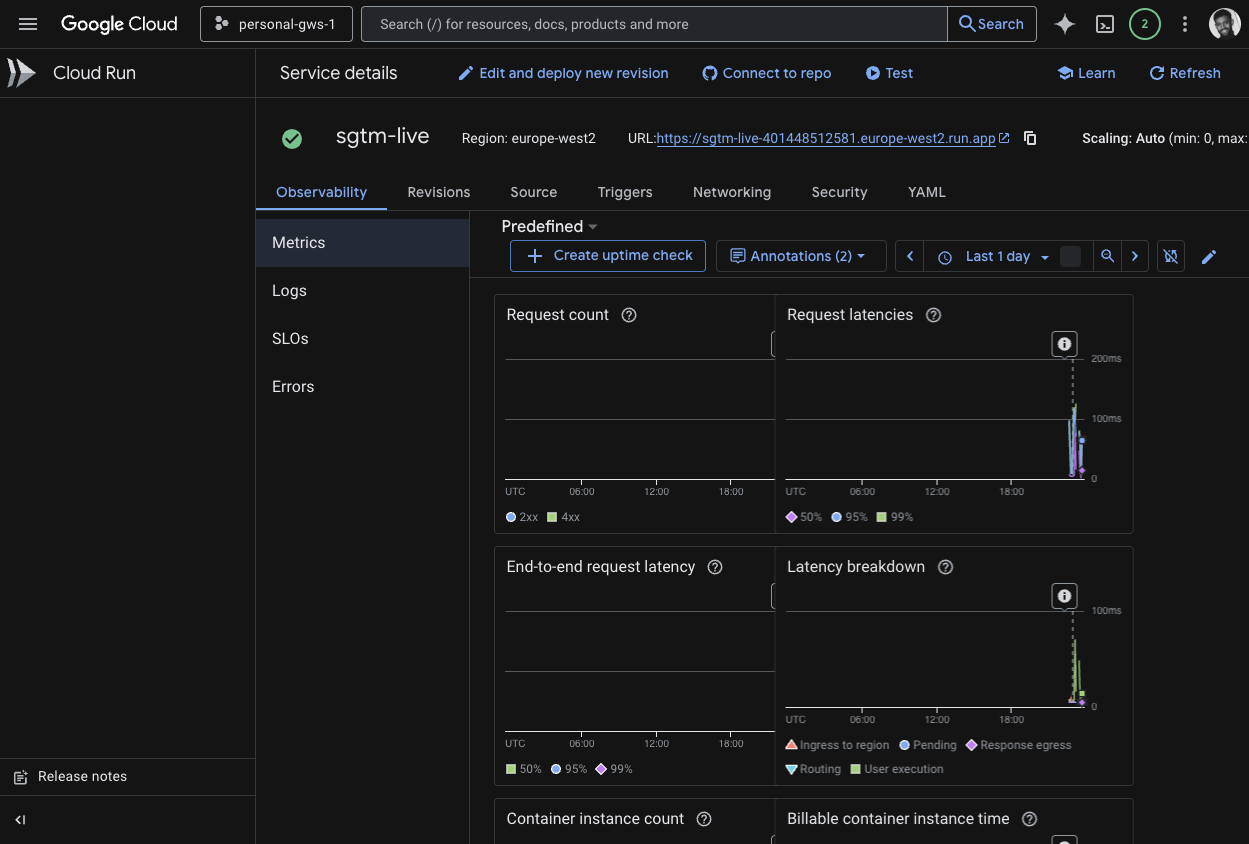
The current service details were verified directly:
metadata:
  name: sgtm-live
status:
  latestReadyRevisionName: sgtm-live-00002-jzs
  traffic:
  - latestRevision: true
    percent: 100
    revisionName: sgtm-live-00002-jzs
  url: https://sgtm-live-6tmqixdp3a-nw.a.run.app
BigQuery linkage
The project and dataset checks are straightforward:
$ gcloud config get-value project
personal-gws-1

$ bq ls --project_id=personal-gws-1
    datasetId
 ---------------
  ga4_498363924
At the GA Admin layer, the property is linked to the BigQuery dataset and attached to the live stream. At the time of the main audit, the remaining caveat was export latency: the link was active, but landing tables had not yet appeared during the same validation window.
That is not a misconfiguration. It is normal GA4 export timing behavior.
Looker Studio
Looker Studio
A live audience-and-devices page from the Looker reporting layer
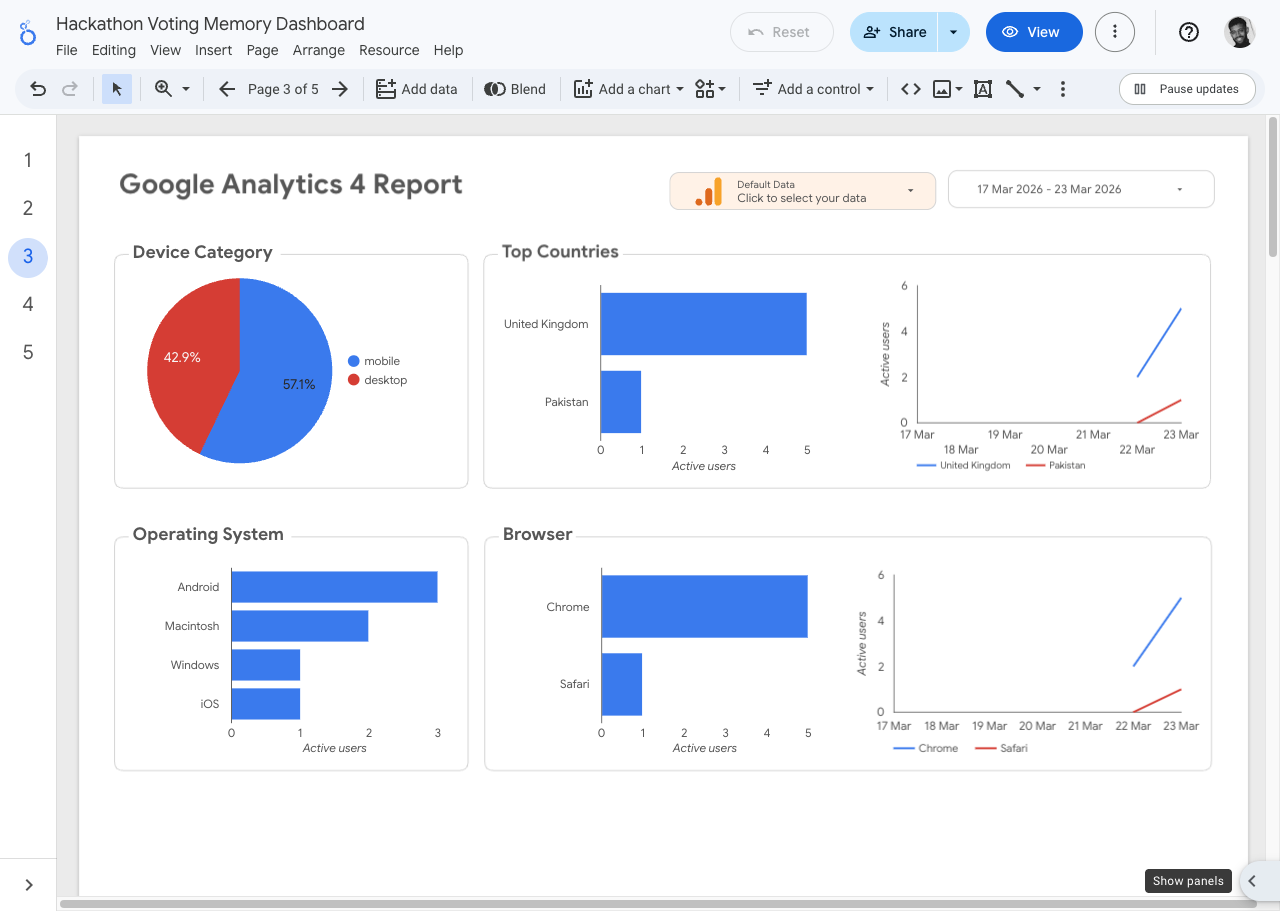
The useful reporting pattern here was to break the dashboard into separate pulse, audience, acquisition, and engagement views rather than forcing every question into one generic canvas.
That is a subtle but important step. Generic dashboards create noise very quickly. The goal here was not to have a dashboard, but to have one that matches how this site is actually used.
The AI-assisted workflow layer
This project also became a useful case study in what an AI-native engineering workflow looks like when it is used carefully rather than theatrically.
What mattered about the workflow was not the novelty of "AI did it." What mattered was the division of labor:
- the site code was changed locally and validated like normal software
- live Google admin surfaces were inspected in a real logged-in browser
- platform state was checked through CLIs and admin APIs
- repo-local docs were updated as part of the implementation rather than left for later
That mix turned out to be the right one. The code changes alone would not have been enough, and the admin clicking alone would not have produced a durable system.
The important thing is that the agent did not use one tool for all of this. It switched between:
- repo-local coding tools when the job was changing the site
- live browser tools when the job depended on authenticated Google state
- CLIs when the job was proving Cloud Run, BigQuery, or deployment status
- repeatable browser automation when the job was acceptance proof rather than exploration
The audit findings that mattered most
A good implementation write-up should not pretend everything was frictionless. These were the most important findings from the actual audit.
1. Consent Mode still sends cookieless pings
This was expected, but it is important enough to repeat.
With GTM present and Consent Mode defaults denied, Google can still issue cookieless pings before analytics storage is granted. That preserves modeled measurement while avoiding analytics storage, but it is not the same thing as hard-blocking all Google network traffic until accept.
2. Rebuilding GTM was the right call
Trying to rehabilitate a noisy, warning-filled, legacy GTM workspace would have made the stack harder to trust. A clean rebuild created a much clearer mental model.
3. The app-owned schema is the real asset
Containers, dashboards, and warehouse links can all be changed later. The durable thing is the site-owned event vocabulary and consent behavior. That is what makes the rest of the stack coherent.
4. BigQuery linkage and BigQuery readiness are not the same moment
The export link can be fully correct before any warehouse tables appear. That lag should be expected and documented rather than mistaken for a broken integration.
The exact stack as shipped
| Layer | Live value |
|---|---|
| Site | https://rajeevg.com |
| Measurement ID | G-675W3V0C78 |
| Web GTM container | GTM-K2VRQS47 |
| Server GTM container | GTM-W4GKTR3H |
| First-party path | https://rajeevg.com/metrics |
| Live sGTM service | https://sgtm-live-6tmqixdp3a-nw.a.run.app |
| GCP project | personal-gws-1 |
| BigQuery dataset | personal-gws-1:analytics_498363924 |
| Looker Studio report | b599834d-939c-4f4d-8b93-b5e3ccab699f |
The Codex-side MCP config that supported this work currently resolves to:
analytics_mcp  enabled
gcloud         enabled
gtm_mcp        enabled
chrome_devtools enabled
playwright      enabled
Those were verified locally with:
$ codex mcp list
analytics_mcp    ... enabled
gcloud           ... enabled
gtm_mcp          ... enabled
chrome_devtools  ... enabled
playwright       ... enabled
The repo surfaces that matter most
If I wanted to explain this system to a future me in five file paths, they would be:
- src/lib/analytics.ts
- src/lib/consent.ts
- src/components/consent-manager.tsx
- src/components/tag-manager-script.tsx
- next.config.ts
And if I wanted the operational record, it would be:
- docs/analytics.md
- docs/google-tagging-stack.md
- output/acceptance/analytics-stack-20260323/live-proof.json
What I would extend next
The stack is complete enough to be useful right now, but the next obvious upgrades are clear.
- Add a warehouse-backed QA page once BigQuery export tables are fully populated.
- Add more derived session and content models in BigQuery for analysis that is awkward in raw GA4.
- Build a reporting page focused specifically on consent state and instrumentation quality.
- Expand outbound click and portfolio interaction modeling if the site becomes more conversion-oriented.
Why I think this was worth doing properly
A lot of analytics implementations stop at "the tag fired." That is the beginning, not the end.
What I wanted here was a system that could answer better questions later:
- what kinds of pages get engaged reading rather than drive-by traffic?
- which site sections pull people deeper?
- which tags, searches, and projects actually lead to navigation?
- how much of the session data is happening under granted analytics storage versus denied modeled measurement?
- can the same event vocabulary survive browser analytics, server-side relay, warehouse export, and dashboarding without translation chaos?
That is why this implementation was worth doing end to end.
It is a consented analytics setup, but it is also a publishing and product-systems setup. The site now knows more about how it is being used, and just as importantly, it knows that in a way that is explicit, documented, and portable across layers.