Rebuild note (2026-08-31): this article was rebuilt to include the full operating loop — contracts, context, tools, permissions, sandboxes, worktrees, telemetry, recovery, acceptance, routing and cost — not just the four monitoring pieces. The earlier version is superseded; the Mac operations centre article still covers how the services and ports themselves work.
Most writing about "AI operations" assumes you run Kubernetes and enjoy it. This article is for the other case: you are technical enough to edit a config file and run a command, but you have no interest in becoming a server administrator. You have several agents doing real work on your machine, and you want them to keep working without becoming a second job.
The claim of this article is specific: Agent Ops is not DevOps with AI in it. It is the discipline of running an operating loop that produces a traceable, disposable piece of work every time it turns. DevOps worries about the availability of long-running services. MLOps worries about models that drift over months. Agent Ops worries about work that is supposed to complete — and about whether it completed correctly, at what cost, and who finds out first when it didn't. If you never separate those three things, you end up copying the wrong playbook and wondering why it doesn't fit.
The loop that makes this work has seven links: a worktree, a contract, a session, scoped permissions, telemetry, acceptance, and a learning path back into the rules. Every one of them is small. Together they are the difference between agents that help and agents that become a hobby.
The loop, not the dashboard
The most common beginner mistake is thinking Agent Ops is a monitoring problem: install Grafana, wire some alerts, call it done. Monitoring is one third of the loop, and on its own it produces anxiety, not recovery. The other two thirds happen before anything runs and after anything fails.
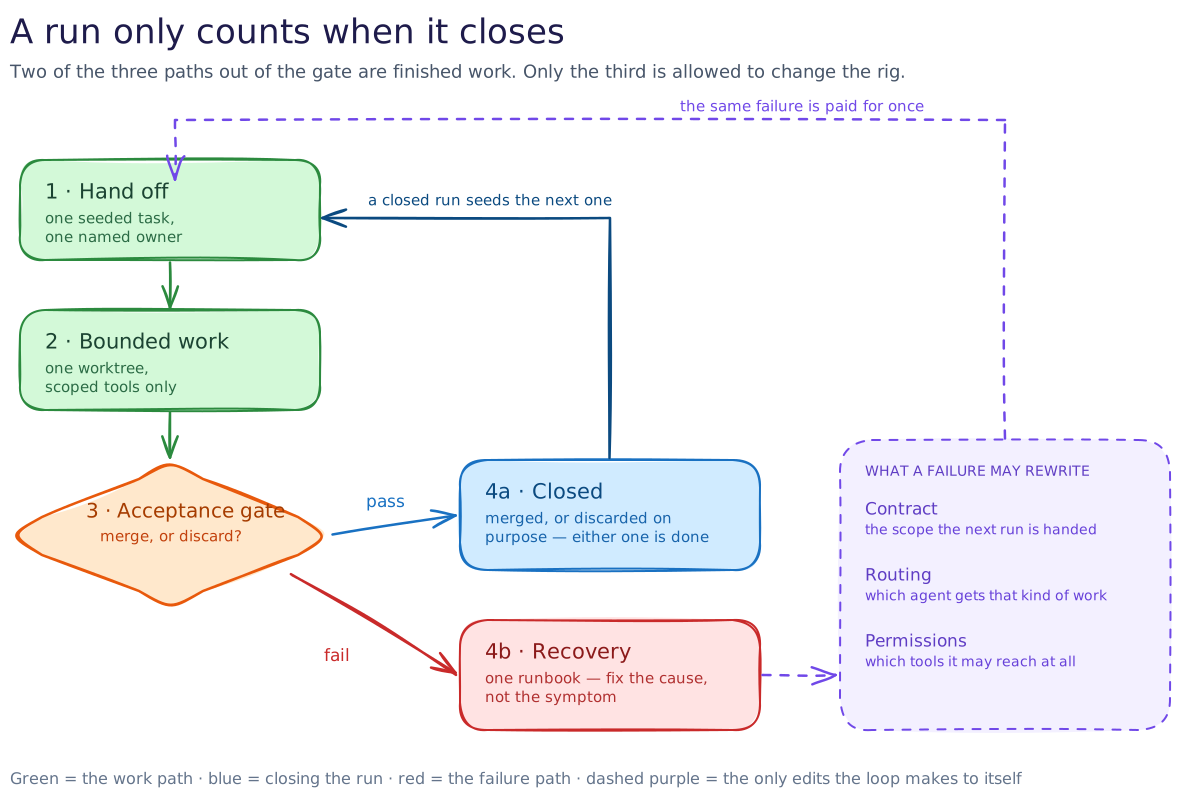
What the diagram adds that prose cannot: the loop closes in two places, not one. The obvious close is from merge back to the next task. The one that actually determines whether you get better or just busier is the learning band — the path from "what just went wrong" back into "what the contract, the routing rule, or the permission should say next time". If your loop only has the first close, you will run the same incident again in three weeks with a different agent name.
The operating sequence, link by link
This is the exact sequence this rig runs for a normal task, from first commit to either a landed change or a thrown-away worktree. The tools change; the links do not.
- Pick up the next task in a disposable worktree. Never let an agent edit your primary working directory. A worktree costs a few seconds to create and makes every failure fully reversible: when the task ends, you either merge the branch or delete the directory. The blast radius of a bad run is one directory you were going to throw away anyway. This is the single highest-leverage habit in the whole discipline and the cheapest to adopt.
- Write the contract before the agent does anything. One short document: what the change is, which files it may touch, what a finished job looks like, and how you will check it. A contract is not a prompt. A prompt says "do the thing"; a contract says "this is done when these three checks pass and these files are the only ones changed." The contract is what turns an agent's word into a checkable claim — and it is what makes "the agent said it was finished" a question instead of an answer.
- Give the agent one session with bounded context. One task, one session, one model. Stuffing every project document into the context window is not thoroughness; it is cost and dilution. The agent needs the contract, the files it will touch, and just enough surrounding context to avoid breaking something it cannot see. Everything else is a retrieval problem, and retrieval is cheaper than memory.
- Issue scoped tool and sandbox permissions, not god mode. The agent gets the tools this task needs and nothing else. File writes are scoped to the worktree. Network access is explicit and justified, not ambient. Shell access, if granted at all, runs inside a sandbox with an allowlist. The rule is not "trust the agent"; the rule is "the agent's blast radius is bounded by what it was handed, so hand it only what the contract says it needs."
- Let telemetry record the run while it happens. Sessions, tokens in and out, cost, latency, retries, which model handled which step — all of it logged by default, not on demand. You do not audit a run after the fact by reading a transcript. You look at the trace and ask the specific questions: did this work go to the cheap workhorse or did it escalate? Did the retry loop fire? What did this session actually cost?
- Prove acceptance against the contract, not the agent's word. The run ends when the acceptance checks pass — the build, the tests, the lint, the link check, whatever the contract named. If the agent reports "done" but the checks fail, the run is not done; it is a failure with extra steps. If the checks pass but the change touches files outside the contract, the run is also a failure, because the contract was the thing you were actually buying.
- Land it, or throw it away, and then learn. Merge into main, push, close the worktree. If acceptance failed and the worktree is beyond saving, delete it and start a fresh session — the sunk cost is one directory, not a week. Then close the loop the diagram shows: did the failure come from a bad contract, a wrong routing decision, or a permission that should not have been granted? That answer is what you change.
That is the whole sequence. The monitoring that beginners install first is link five and half of link seven. The habit that separates the rigs that survive from the ones that rot is links two and six — the contract and the proof.
Why contract-first beats prompt-first
The reason contract-first works is economic, not philosophical. A prompt is cheap to write and expensive to verify, because you have to read the output to know if it is right. A contract is slightly more expensive to write and much cheaper to verify, because the checks do the reading for you. Every hour you spend tightening a contract is an hour you do not spend re-reading agent output that claims to be finished.
Contracts also compound. Each time a task fails in a way the contract should have caught, you add a check. Six months in, your contracts encode everything the team has learned about how this work goes wrong — which is exactly the knowledge that lives in a senior reviewer's head today, made executable and therefore delegable. That is the real point of the whole discipline: not "AI does the work", but "the definition of done becomes a thing a machine can check, so the work can be delegated at all."
The failure modes that actually eat beginners
These are the recurring ways an agent rig rots, in rough order of how much damage they do per month of ignoring them.
| Failure mode | What it looks like | What it costs | What fixes it |
|---|---|---|---|
| No contract | "It said it was done" as the acceptance test | Re-work, silent breakage, agents you cannot delegate to | Write the contract first; checkable acceptance criteria, not vibes |
| Shared context | One mega-session carrying three weeks of accumulated context | Cost bloat, dilution, the agent confidently wrong about the current task | One session per task; retrieval over memory |
| Unscoped permissions | Agent has ambient shell, network, or write access everywhere | Blast radius is the whole machine, not one worktree | Scope tool grants to the contract; sandbox by default |
| Missing telemetry | No idea what anything costs or which model did what | Bill shock, and no way to know when escalation earned its cost | Log every call by default; review weekly, not after the fact |
| Alert fatigue | Every alarm looks the same, so nothing gets looked at | Real failures hidden in the noise; the on-call becomes the person who learned to ignore it | One human channel; one runbook per known failure; blast radius decides urgency |
| Orphaned session | Agent process still running after its task is over | Tokens burning for nothing; state that no one owns | Keeper restarts what died; the session dies with the worktree |
| No learning loop | Same incident three times because nothing fed back into the rules | The rig becomes a museum of past decisions | Post-fix review into contract, routing, and permission rules |
The pattern across all seven: none of them are exotic. Every one is a shortcut that feels free the day you take it and bills you continuously for months. The loop in the first diagram is not bureaucracy; it is the shortest set of habits that keeps each of these failure modes from compounding.
Cost control without becoming a spreadsheet person
Two levers do most of the cost work, and neither requires an accounting degree.
The first is routing by default: cheap model for routine work, stronger model only when the task genuinely needs it. This rig routes everyday coding and editorial work to a fast, cheap workhorse and escalates to a frontier model only when the task names a reason — architecture, genuine ambiguity, a decision with real consequences. The evidence for whether an escalation was worth it comes from the telemetry in link five: you can look at the specific trace where the frontier model ran and ask what it produced that the workhorse could not. The routing article covers this in detail.
The second is context discipline: the session carries what this task needs, not what the project has ever known. Every layer that re-reads context re-bills it. The cost anatomy breakdown shows how orchestration layers turn one unit of work into four bills without changing the work itself. Contracts and worktrees are also cost tools, not just safety tools: a bounded contract means the agent does not wander, and a bounded worktree means a bad run costs minutes instead of hours.
The budget is the output of the loop, not the input. You do not set a monthly cap and hope. You look at what each class of task actually costs per the telemetry, decide which classes are worth their price, and change the routing rule when one is not. The budget is a rule, and rules are editable.
Retries and recovery without heroics
Retries are where beginners either panic or burn money, and the fix in both cases is the same distinction: transient versus structural.
A transient failure — network blip, rate limit, a model that returned an empty response — is worth one automatic retry. If the same call fails twice for the same reason, it is no longer transient and retrying is just burning money on a deterministic failure.
A structural failure — the contract was ambiguous, the permission was wrong, the model was the wrong choice for the task — is never fixed by a retry. It is fixed by changing the thing that made it likely: the contract language, the tool grant, the routing rule. Retrying a structural failure is not resilience; it is hoping.
Recovery is simpler than it sounds once worktrees exist. If a run went bad and the worktree is salvageable, the agent fixes the specific failure and re-runs acceptance. If it is not salvageable, you delete the worktree and start a fresh session with a better contract. The keeper — launchd on this rig, systemd on Linux, whatever supervises processes on your platform — restarts what died and does nothing else. A keeper that also tries to recover state is a second failure mode wearing a recovery costume.
Acceptance: proving it, not vibe-checking it
Acceptance is the only thing that makes an agent output a deliverable instead of a draft. The pattern is the same whether the task is code, content, or a data pipeline:
- The contract names the checks, not the agent. "Build passes, tests pass, the article renders without broken links, no unrelated files changed" is a contract; "make it good" is not.
- The checks are independent of the agent. They run outside the agent's control — CI, a script, a human with a checklist — because an agent marking its own homework is a single point of failure dressed as a quality gate.
- The checks are cheap enough to run every time. If acceptance takes longer than the work, people will skip it, and then you are back to vibes. The right level of proof is the one that actually runs.
The proof artefact matters too. This rig keeps a short acceptance note per task: what was built, what checks ran, what evidence exists, what is deliberately not covered. It costs a paragraph and it turns "trust me" into a document the next session can build on. The readiness article uses this same evidence-first gate at portfolio scale.
Sandboxes, worktrees, and task isolation in one paragraph
Isolation is a stack, not a single feature, and the layers are independent. A worktree isolates file changes — one task, one directory, throw it away whole. A sandbox isolates system access — what the process can touch outside the worktree, on the network, in the shell. A session isolates context — what the model is carrying, and therefore what it can confuse. A task isolates scope — what is in the contract and therefore what "done" means. You can run a rig with two of these and be fine; you cannot run one with zero and be fine for long. The cheapest two are the worktree and the session boundary, and those are also the two beginners skip first.
The common failure that starts all the others
If you adopt one thing from this article, make it the contract. Not because contracts are philosophically important, but because the contract is the thing that makes every other link possible. Without a contract, telemetry tells you what was spent but not whether it was worth it. Without a contract, acceptance has nothing to check against. Without a contract, routing has no basis for deciding what class of work this even is. A rig with good contracts and nothing else will outperform a rig with dashboards and prompts and no contract, every time, because the second rig cannot answer the only question that matters: how do you know it worked?
An agency example, and what transfers
The same loop works outside engineering. Consider a marketing agency with three agents: one drafts client reports, one collects competitor mentions, one schedules social posts. The naive version — one prompt each, no contracts, shared inbox — produces work that "looks finished" and costs three people a day to review.
The contract-first version:
- Report agent: contract says the report is done when every claim has a sourced number, the template matches last month's, and no metric appears that the data layer does not contain. Acceptance is a script that diffs the metric list against the source data.
- Mention agent: contract says the collection is done when every competitor mention has a source URL and a date, and anything ambiguous is flagged rather than guessed. Acceptance is a spot-check of five random rows by a human who is not the agent.
- Scheduling agent: contract says the queue is done when every post has an approved label, a fallback time slot, and a deletion path. Acceptance is a preview link that a second human approves before anything goes live.
Nothing here is about AI capability. It is about making the definition of done checkable so the work can be delegated at all. The four original pieces — a keeper, a window, an alarm, a written fix — are still there; they just stop being the whole story.
Agent Ops vs DevOps vs MLOps, in one table
| DevOps | MLOps | Agent Ops | |
|---|---|---|---|
| What runs | Long-lived services | Trained models on schedules | Sessions that complete and exit |
| Primary failure | Downtime, latency, drift | Model decay, data drift | Wrong work, runaway cost, silent failure that looks like success |
| Unit of work | A release | A training run or an inference batch | A task with a contract and an acceptance check |
| Isolation unit | Container, namespace | Experiment, model version | Worktree, session, scoped permission |
| Recovery model | Roll back the release | Retrain or roll back the model | Delete the worktree, fix the contract, start a new session |
| Cost lever | Infra efficiency | Compute budget, feature count | Context size, routing rule, contract tightness |
The rows that matter are the first and the third. Because agent work completes rather than persists, the unit of operations is not a service you keep alive — it is a task you can accept, merge, or throw away. Playbooks built for services (uptime SLAs, canary deploys) mostly do not transfer. Playbooks built for tasks (contracts, acceptance, disposable environments) do, and they are the ones this article is about.
A practical operating checklist
Run this once per task, not once per month. It takes about four minutes per task and saves hours per week.
- Worktree created before the agent touches anything.
- Contract written: what done means, which files, which checks.
- Tool grants scoped to the contract; sandbox on by default.
- One session; context limited to what the task needs.
- Telemetry logging confirmed before the run starts.
- Acceptance checks run independently of the agent's own report.
- Merge, or delete the worktree and start a fresh session.
- Post-fix note: what failed, what rule changed, what the next contract should say.
The last item is the one people skip and the one that decides whether the rig gets better. The first seven keep you running. The eighth makes you accumulate compounding returns instead of accumulating incidents.
Where to go next
- The agent telemetry stack, explained from first principles — where the metrics that feed link five come from
- I made GLM-5.3-Flash faster but kept cheap routing — how the routing rule and the budget interact in practice
- Why agent systems become slow, expensive, and fragile — the cost anatomy behind context discipline
- What should be an agent — and what should be normal code? — deciding what deserves this operational care at all
- Your Mac as an AI operations centre — how the services and ports themselves work