A capable Mac — the one you already own — is a surprisingly good operations centre. It has a real Unix underneath, it sleeps when you close it, and it is already with you. This article is the machine-level companion to Agent Ops for people who don't run infrastructure: that article describes the operating loop that runs on top of this machine; this one describes the machine itself — what runs on it, where the boundary is, and how to reach it from your phone without exposing anything to the internet.
The claim is specific. A Mac becomes an operations centre the moment you can name three things with confidence: what listens where, what can reach what, and what happens when it stops. Everything else — the dashboards, the agents, the alarm to your phone — is an application of those three answers. If you cannot state them, you do not have an operations centre; you have a pile of services you hope work.
This rig runs exactly that setup today. Every port named below is real, every component is the one actually in use, and the boundary drawn in the first figure is the boundary the machine enforces — nothing self-hosted faces the internet, and the only way in from outside is a credentialed private network.
The layers, in plain English
The stack has four layers, and each one answers a different question.
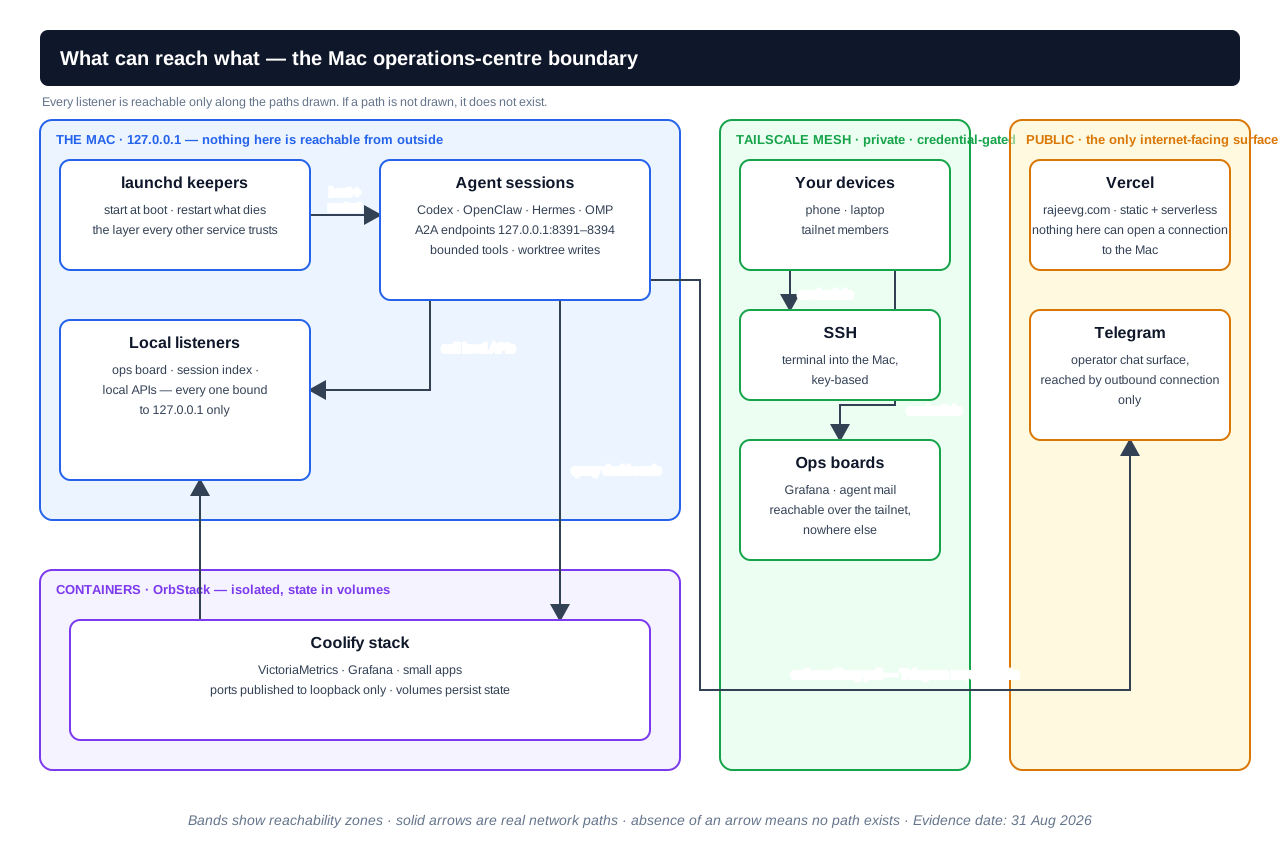
What can reach what. Every listener is reachable only along the paths drawn: the Mac's own services, agent A2A endpoints on 127.0.0.1:8391–8394 and OrbStack containers all live inside the loopback zone; your devices, SSH and the ops boards reach them only through the Tailscale mesh with credentials; Vercel and Telegram face the internet, but Telegram is reached by an outbound connection the Mac itself opens. If a path is not drawn, it does not exist. Open the full-size diagram, or download the editable draw.io source. Evidence date: 31 August 2026.
What the figure adds that prose cannot: the connectivity, not the inventory. A list of components tells you what exists; the bands show what can reach what — and, just as importantly, what cannot. There is no arrow from Vercel into the Mac because no such path exists. There is no arrow from Telegram into the Mac because Telegram never dials in; the Mac holds an outbound connection open. Once you have seen the boundary drawn, "is this safe?" stops being a feeling and becomes a lookup.
Processes and ports — what the machine is doing
Everything running on your Mac is a process, and every network service a process offers listens on a numbered port. When this article says localhost:3000, it means "port 3000, on this machine only". The address 127.0.0.1 — the loopback address — is a loop the network stack never sends outside the machine. A service bound to loopback is unreachable from your Wi-Fi network, let alone the internet, no matter what your firewall or router does. That single property is what makes the whole architecture safe by construction rather than by configuration: the default is private, and you have to take a deliberate, visible action (bind to 0.0.0.0, or forward a port) to make something public.
This matters for a practical reason. On a rig like this one, a dozen services run at any moment — agent sessions, collectors, dashboards, small apps — and none of them should be individually hardened, because none of them is reachable in the first place. The hardening happens once, at the boundary, instead of twelve times, at each service.
launchd and services — what keeps running
A service is a process that should keep running: it starts at boot, restarts when it dies, and records when it did. On macOS the mechanism is launchd. A launchd plist (a small XML file in ~/Library/LaunchAgents/) says what to run, when to run it, and what to do when it exits. launchctl kickstart starts one; launchctl print shows its state and last exit code; the logs land in files the keeper also rotates. This is the layer the rest of this site's operations depend on — the keepers that restart agents, collectors and alert channels all live here.
The beginner-relevant property is not the XML syntax, it is the contract: a service supervised by launchd has exactly one owner and one recovery path. It either comes back up on its own or it stays down and says so in its log. Nothing else on the rig tries to resurrect it, because a supervisor that also improvises is a second failure mode wearing a recovery costume.
OrbStack and containers — what runs in isolation
Some services run best isolated: the VictoriaMetrics metrics store, the Grafana dashboards, and a small Coolify-managed stack live in containers rather than directly on the Mac. Isolation buys two things. First, dependency separation — a container brings its own libraries and runtime, so it cannot conflict with anything else on the machine. Second, clean state — each container mounts named volumes, so the metrics history survives a container replacement and a container can be deleted and recreated without touching the host.
On a Mac the container runtime of choice here is OrbStack, which provides the Docker engine without the ceremony and resource footprint of Docker Desktop. orb starts it, orbctl manages machines, and ordinary docker commands work unchanged. The one line that matters for the boundary is this: containers that must be reachable are published with their ports bound to 127.0.0.1, not to all interfaces. That is the purple band in the figure — isolated from the host, but still inside the loopback perimeter.
The outside world — what is deliberately public
Exactly two things face the internet. Vercel serves rajeevg.com — a static and serverless site with no state and no ability to open a connection back into the Mac. Telegram is the operator chat surface, and it is reached by the opposite of a public port: the Mac's agent holds an outbound connection (a long-poll) to Telegram's servers, so no inbound port ever exists to attack. The public surface is therefore two services, neither of which can initiate anything toward the machine — and that is the entire exposure of this rig.
The boundary, and why it is drawn in one piece
The architecture above has one security property that makes everything else simple: the boundary is a single line, not a per-service judgement call. Services are not individually made safe; they are individually made unreachable, and safety is provided by the two paths that cross the line — Tailscale in, Vercel and Telegram at the public edge, neither of which can dial in.
This is worth dwelling on because it is the difference between an architecture you can reason about and one you merely hope about. A rig where each service has its own authentication, its own exposure setting and its own failure mode is a rig where "am I secure?" is a research question. A rig where the answer is "loopback plus my tailnet" is a rig where the question has a one-sentence answer, and where a mistake — a dashboard accidentally bound to 0.0.0.0, a token pasted into a public file — stays inside the perimeter instead of becoming an incident. The boundary is also what makes sleep safe: when the machine closes, nothing inside the perimeter is running, and nothing outside can get in.
The practical rule that falls out of this: if you cannot draw the arrow, do not ship the service. Before adding anything new, the question is not "how do I secure this?" but "where does its band go, and what connects to it?" If the answer is "the internet, directly", the service is a design mistake before it is a configuration one.
The phone-to-system journey
This is the practical payoff of the boundary: an incident finds you on your phone, from anywhere, without a single public port existing.
- An alarm fires. A collector stops reporting, a service dies and does not come back, or a token burn exceeds its budget. The alert path is one human channel, not a dashboard you have to remember to look at.
- Your phone receives it. The Telegram bot delivers the message through the outbound connection described above. Because the Mac reached out rather than listening, the alert works from hotel Wi-Fi, a train, or a phone in another country.
- You open the board. Grafana or the ops board loads over the tailnet. The tailnet is running, so this works the same at home as it does from anywhere else — the network is the mesh, not the room you are sitting in.
- You read the runbook. Every known failure has a named runbook: what it means, what to check first, what the fix is, and when to delegate instead of doing it yourself.
- You fix it, or delegate the fix. A one-line restart you do over SSH. Anything bigger goes to an agent, in a worktree, with a contract — the loop the Agent Ops article describes.
- You confirm recovery. The telemetry — not the vibe — says the counter is moving again and the failure did not repeat.
What the journey buys for a real operator: a client escalation at 11pm becomes a two-minute check instead of a night in front of a terminal, because the alarm, the board and the runbook are all reachable from the device in your pocket. The journey is the whole reason the boundary matters — it is what the perimeter is for.
When the boundary is wrong
Three mistakes account for most real-world incidents in self-hosted setups, and each one is a specific, named failure rather than a vague sense of "insecurity".
A dashboard bound to 0.0.0.0. The most common single mistake. A service meant for the loopback zone is configured to listen on all interfaces, and it becomes reachable from every device on the local network — and, if port forwarding exists, from the internet. The fix is not a firewall rule added afterwards; it is the binding itself, checked before the service is considered running. On this rig the check is the rule: nothing binds to anything but 127.0.0.1 unless the band map has been redrawn to say so.
Credentials visible in screenshots. Dashboards, terminal windows and chat messages leak more than people expect. A screenshot shared in a chat or attached to a public post can carry a bearer token, a session cookie or a URL with a key in it, and the boundary that stopped an outside attacker at the network layer does nothing about it. The fix is a habit, not a tool: redact before sharing, and treat every credential that has appeared in an image as rotated, not merely hidden.
"It sleeps" treated as security. Closing the lid pauses the services — that is a feature for a personal rig, because it bounds the bill and the risk. But sleep is a schedule, not a boundary. The boundary is the network path. A machine that sleeps at night and is reachable, misconfigured, during the day has not been protected by the sleep; it has merely been protected part of the time. The correct statement is: the boundary is loopback plus the tailnet, and sleep is a bonus on top of it.
Each of these has the same shape: the perimeter was assumed to be one thing while it was actually another. The figure's value is that it makes the assumption explicit and checkable, rather than something each new service quietly violates.
Laptop sleep, honestly
Sleep pauses everything — agents, containers, collection, alerting. For a personal rig that is the correct default, not a limitation to apologise for. The bill is bounded by the hours the machine is open; the attack surface is bounded the same way; and a rig that only runs when you are working is a rig that cannot surprise you at 3am with an invoice.
The trade-off is honest and worth stating plainly: a sleeping Mac is not an operations centre for anything that must be continuously available. Long-running collection, a public-facing API, an uptime-critical agent — those belong on a small always-on host, and this rig uses one: the two-agent personal cloud runs OpenClaw and Hermes on Coolify over Hetzner precisely because those workloads must outlive a closed lid. The laptop and the cloud host are complementary: the laptop is the dense, local, cheap surface where most work happens; the small host is the thin always-on surface for the things that cannot pause. Knowing which workload belongs where is the decision that keeps both honest.
Where to go next
- Agent Ops for people who don't run infrastructure — the operating loop that runs on this machine day to day
- The agent telemetry stack, explained from first principles — what the dashboards are made of and where the numbers come from
- Building a two-agent personal cloud on Coolify and Hetzner — the always-on half of the boundary, and what belongs there instead of on the laptop