Correction (2026-09-13, same day). The first version of this article claimed the shortlist held about 42% of the collection, so more than half the instruction sheets could never be shown. That was my own arithmetic (24,000 tokens of summaries against a 10,000-token budget) and it was wrong, because the tool trims each summary instead of showing it in full. Measured against what the assistant is actually handed: 315 of 343 on the desktop path, 250 of 343 for background helpers. The list is not the broken part. The section below is the corrected version, and it keeps the mistake visible because the wrong number was more quotable than the right one.
I keep written instructions for my AI assistant. One for auditing ad tracking on a website, one for spreadsheets, one for driving a browser through a checkout flow, and so on. It has 343 of them now.
Last month it spent about eighty steps working out a procedure I had already written down six days earlier.
That is the whole article in one sentence. The assistant has instructions, and sometimes cannot see them. Everything below is about why, and what I did.
The instruction sheets
Each one is a folder with a short text file. The first few lines hold a name and a one-line summary. The rest is the actual procedure.
The assistant is not handed all 343 files. It is shown the name and summary of each, and reads the full file only when something looks relevant. That design is sensible and it is standard across AI tools. Showing everything would flood the assistant and make it worse at the thing you asked for.
So the question is not "why isn't everything loaded". It is "how big is the shortlist, and what happens when the answer is not on it".
I got the number wrong first
I worked this out on paper before I measured it.
Take all 343 instruction sheets. Add up the name and summary for each. That comes to roughly 24,000 tokens of shortcut text, and the tool's documented budget for the shortlist is 10,000 tokens. Divide one by the other and you get about 42%.
I wrote that down as "half my instruction sheets can never be shown". Then I checked it against what the assistant is actually handed, and the number was wrong. Not slightly wrong. Wrong in a way that changed the conclusion.
| Where the assistant runs | Sheets shown | Missing |
|---|---|---|
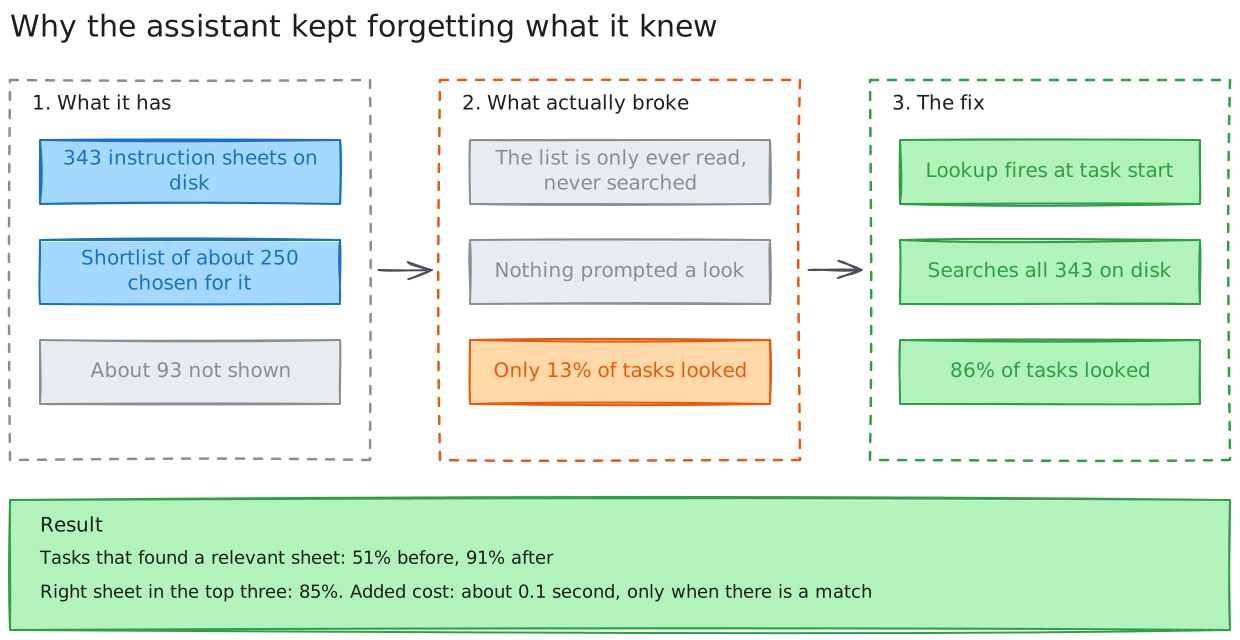
| The desktop app I use daily | 315 of 343 | about 28 |
| Background helpers doing long jobs | 250 of 343 | about 93 |
The reason my arithmetic failed is that the shortlist does not show summaries in full. It trims each one to its first sentence. That is why the list the assistant receives has entries that stop mid-word, like a description ending "...and derive visual varia". Shorter entries mean many more of them fit.
It also does not simply take the first 343 and cut the rest off. It chooses a set, and the set changes between sessions. Across 34 sessions I logged ten different list lengths, from 238 skills to 315, with different sheets swapped in and out. On the desktop path the shortfall is about 28 sheets, and they are mostly template and plugin sheets I almost never use.
Why the measured number is the one to trust. The calculated number measured text; the measured number measures what is actually in front of the assistant. Only the second one can be checked, and only the second one turned out to be true. It also moves the story somewhere more useful, because it takes away the easy explanation.
The easy explanation was "the list is broken". The list is not broken. It shows about 92% of the collection on the path I actually use.
So what was broken?
How I found it
Shortlists are hard to see going wrong. Nothing errors, nothing looks broken, and the assistant never says "I could not find your notes on this". So I went to the transcripts and counted.
I went back through 1,463 saved ones and looked at how often the assistant consulted an instruction sheet at all.
- 3% consulted one before I had written any rule about it.
- 13% consulted one once the rule existed in the assistant's standing orders.
- 86% consulted one once I made the check fire on its own.
Read the middle number again. Writing "always look for an instruction sheet first" into the rules moved the figure from 3% to 13%. Instructions to look are requests, and requests get skipped.
That is the part I had been missing while I was busy measuring shortlist sizes. The sheets were mostly there. Almost nobody was looking at them.
Why the built-in version did not save me
This is the part I got wrong, so it is worth stating carefully.
The tool already contained software for choosing instruction sheets. I found traces of it in the program itself: code that matches names by fuzzy text, blends two ranking methods, and an experiment that measures its own accuracy. I had rebuilt something that already existed.
What I had wrong was the shape of the thing. It is not a search box. It is the machinery that decides which sheets go on the shortlist. It runs before the assistant sees anything, picks about 315 of the 343, and routes whatever is left over into "unavailable" or "deferred" rather than offering a way to go and find them.
I confirmed it exposes nothing the assistant can call. I turned its switch on explicitly, listed every tool available, and got 101 tools. None of them searches instruction sheets. There is no "show me the rest" and no way to ask a question of it.
Two more things made it a poor fit.
I could not widen it. The documented limit says explicit values are capped at 10,000 tokens. I tried setting it to 50,000 anyway. The shortlist stayed at 250 entries. The cap holds.
It was switched off for the assistant's helpers. The delegated workers, which run the long jobs, had it explicitly disabled. That line arrived through a bulk configuration import months ago with no note recording a reason. Nobody decided it should be off. It was just off.
So the tool had a door, and the door only opened onto the sheets someone else had already chosen.
The fix, in three small pieces
- A search that reads every sheet off the disk. Not the shortlist. The disk. It takes about a tenth of a second and cannot go stale, because it reads what is actually there.
- A check that runs automatically at the start of every task. It puts the best matches in front of the assistant before it begins. No more depending on it to remember to look.
- Better choice of search words. This was the real bug, and it took two passes to see.
The first pass was the obvious one: the check took the longest words in your request and demanded that all of them appear, so one awkward word made the whole search return nothing. Silent. Letting it retry with fewer words fixed that, and took the hit rate on 120 real requests from 11% to 47%.
Then I looked at the queries it was actually building and realised longest is not the same as most useful. "Put the invoice totals into a spreadsheet" produced the search words spreadsheet invoice extract — and invoice appears in none of my 343 sheets, so it was wasting one of only three slots. The word that mattered was spreadsheet.
So the check now picks its words using the sheets themselves:
- it only uses words that appear in at least one sheet, so a word nothing contains cannot waste a slot
- it prefers distinctive words over common ones — prometheus beats exporter, even though exporter is longer
- it spots two-word phrases that belong together, like design review
- it understands that spreadsheet and spreadsheets are the same word
- and it stays quiet when a message carries no task at all
That last point matters more than it sounds. With a catalogue this size, almost any message contains some word that appears in a sheet somewhere. Without a rule to stay quiet, the check would fire on "thanks, that's great" and clutter every reply with irrelevant suggestions.
How it does now
Measured two ways, both against my own history.
Does it find anything? Over 120 real requests: 91%, up from 51%. The old method found nothing on 4 messages in 10.
Does it find the right thing? Over 20 requests where I know the correct answer: the right sheet appeared in the top three 85% of the time, up from 80%.
Does it stay quiet? 1 time in 22 on conversational messages, so it is not spraying suggestions into ordinary chat.
What it costs
About a tenth of a second per task, measured directly on both the success and failure paths. Roughly 75 tokens added to the assistant's context, and only when there is something relevant to show.
It runs one process per request whether or not it finds anything, so failure is not the expensive case.
What it does not fix
The matches are suggestions, not answers. In the 20 cases where I knew the right sheet, it missed the top three 3 times — and in a couple of those the sheet it did surface was arguably fine. A request to write a requirements document surfaced payment and marketplace sheets, which is defensible and also not obviously right. The assistant still has to judge what it is shown.
Around one request in ten produces no match at all, usually because it contains nothing to go on: "give me the link to it", "please implement 1 and 4". Staying quiet there is correct — better than guessing — but it means the sheet has to be findable some other way, which is the argument for keeping the shortlist.
What I took from it
The failure was silent. Nothing errored, nothing looked broken, and the assistant never said "I could not find your notes on this". It just worked harder than it needed to. Silent failures do not get fixed by adding features; they get fixed by counting.
Second, the list was never the problem. I spent a while convinced it was, because a wrong calculation gave me a headline number. A bigger list would have changed nothing. What changed things was making the lookup happen at all.
Third, and the part I keep coming back to: the built-in software was not broken, and it was not even the wrong shape of idea. It decides what to put in front of the assistant. Nothing in it was ever going to make the assistant look. Worth checking what a feature is for before deciding it is missing, and worth measuring before deciding it is broken.