When I started using Jev Ultrafast I could not answer a basic question about my own setup: which part calls which?
Did my agent call Jev, then hand the answer to something that drove the browser? Or did the browser tool call Jev itself? The pieces had names, and the names did not say who was in charge.
This is that answer, with the code path traced end to end.
The parts
Four things matter. Nothing here needs prior knowledge of Jev.
Jev is a model that picks the next action on a web page. You give it a goal and a description of what is currently on screen. It returns one action. It runs remotely over HTTP, so each decision is a network call.
The Agent loop is ordinary Python, shipped with Jev. It owns the goal, keeps the history, and repeats until the task finishes or it gives up. It does not think, and it is not a language model. It is a loop with a state machine.
BridgeBrowser is the class I wrote. It is the boundary between the loop and the browser. It takes a decision and makes it happen.
The transport is whatever actually drives Chrome. I use two interchangeably: Playwriter and Browser Relay.
Who calls whom
The short version: a script starts the loop. The loop calls Jev to decide, and calls BridgeBrowser to act. Jev never touches the browser, and the transport never calls Jev.
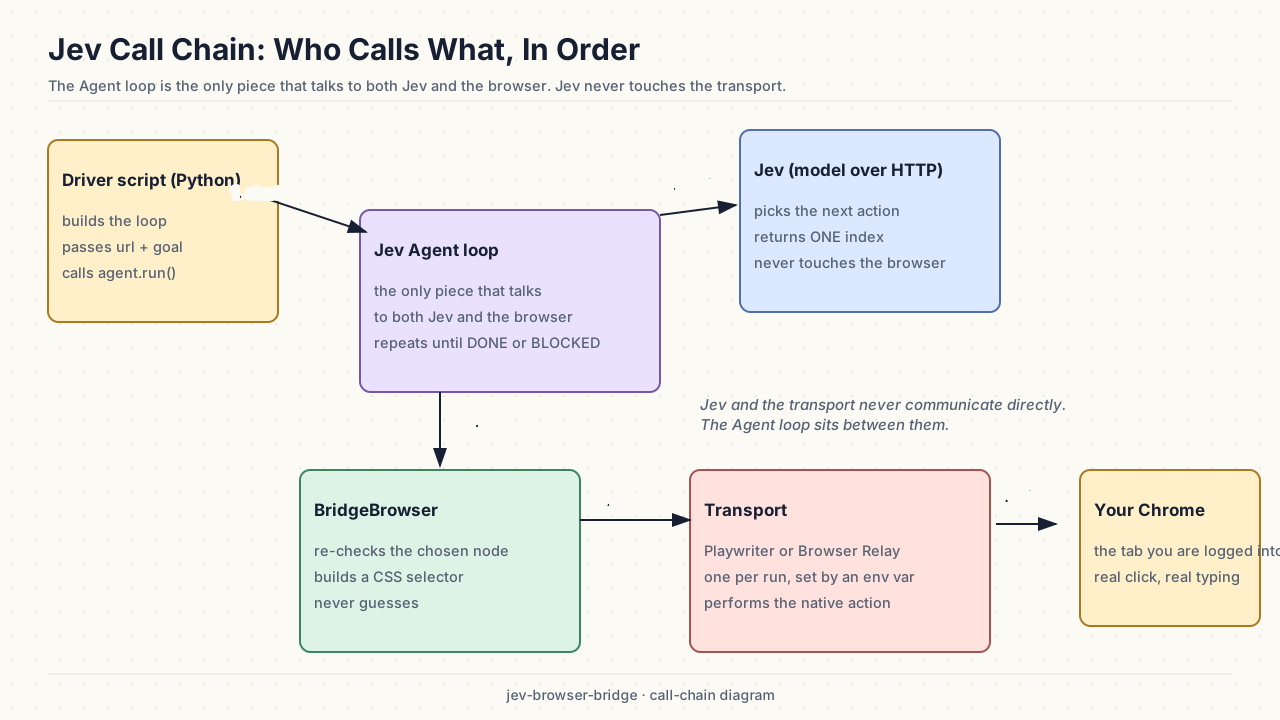
The Agent loop is the only part that talks to both sides. Download the editable Excalidraw source.
Step by step, in order:
- A driver script builds the Agent loop, passing it a URL and a goal:
Agent("https://demo.playwright.dev/todomvc/", "Add two todos, then click Active"). - The script calls
agent.run(). That yields control to the loop. - The loop asks the browser what is on the page, and gets back a numbered list of things it could act on.
- The loop sends that list and the goal to Jev, with one question: which action next?
- Jev returns a decision. This is where the whole design turns, so it gets its own section below.
- The loop hands the decision to BridgeBrowser.
- BridgeBrowser turns it into something a browser can execute, and gives that to the transport.
- The transport performs a real click or keystroke in your Chrome tab.
- The loop observes the page again, and goes back to step 4.
There is no step where Jev sees the browser, and no step where the transport knows about Jev. The Agent loop is the only piece holding both ends.
What actually crosses each hop
This is the part that took me longest to be sure about, because the word "action" hides the important detail.
The model chooses from a menu. Every observation produces a numbered table of the interactive elements on the page:
[1] textbox  What needs to be done?
[2] link     All
[3] link     Active
[4] link     Completed
Jev answers with one index from that table. Not a CSS selector, not a coordinate, not a line of JavaScript. If it wants the Active filter, it returns 4.
Everything after that is the code's job.
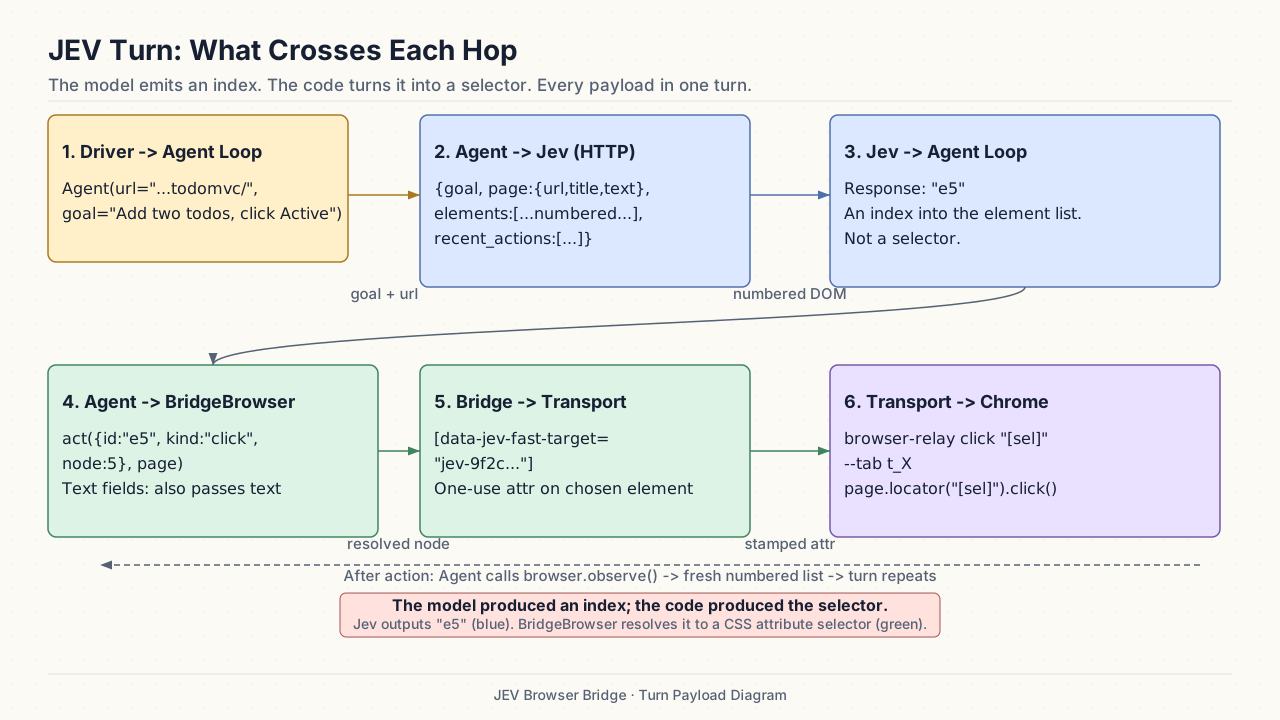
The model produces an index. The code produces the selector. Download the editable Excalidraw source.
The two payloads that matter:
Into Jev: the goal, the page's URL, title and visible text, the numbered element list, and the last few actions taken.
Out of Jev: one index, plus a confidence score.
BridgeBrowser then runs three checks before anything is clicked. It checks the page has not changed underneath the decision. It checks the exact element it numbered is still there, still enabled, still visible, and not covered by anything else. Then it stamps a short-lived attribute on that element, for example data-jev-fast-target="jev-9f2c...", and hands the transport a selector built from it.
That indirection is the safety property. A model that returns [99] when there are four elements cannot click anything, because no such element exists. If the page re-rendered since the decision, the loop throws the decision away and observes again rather than acting on a stale target.
If the element is a text field, the loop needs a value to type. It asks a small separate model for that one string, using the goal and the field's label, and passes the result along as text. This is the only other model call in the turn, and it only happens for fields.
The two transports
Once BridgeBrowser has a selector, the rest is interchangeable. An environment variable picks which of the two runs.
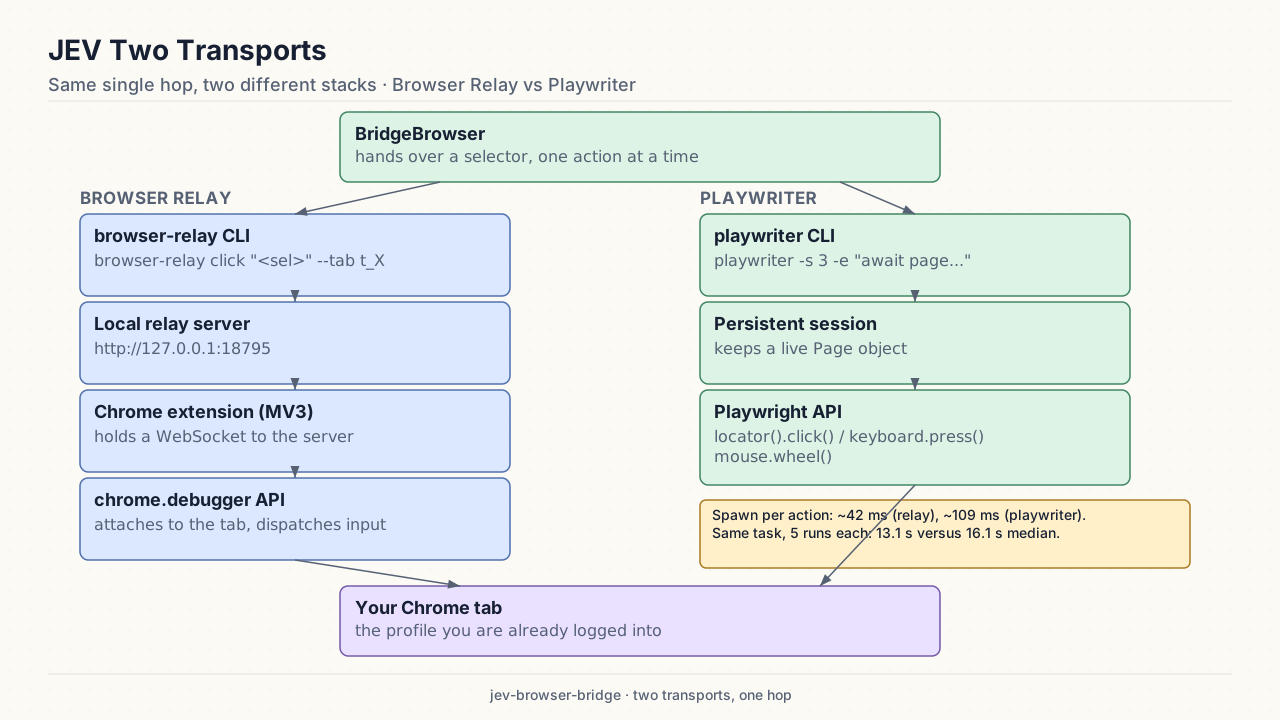
Same hop, two stacks. Both end in the Chrome profile you are already logged into. Download the editable Excalidraw source.
Browser Relay runs a local server that holds a WebSocket to a Chrome extension, which uses the chrome.debugger API to drive the tab. Each action is one CLI call:
browser-relay click '[data-jev-fast-target="jev-9f2c..."]' --tab t_M0X65KrUJQPlaywriter keeps a session open with a real Playwright page object pointed at the same tab, and evaluates a short snippet per action:
playwriter -s 3 -e "await page.locator('[data-jev-fast-target=\"jev-9f2c...\"]').click()"Both spawn a process per action, and that is the dominant per-action cost. On this machine a spawn measures about 42 ms for browser-relay and 109 ms for playwriter, because the Playwriter CLI starts more before it runs anything. Over five runs each of the same task with the same decisions, that difference showed up as a 13.1 second median on Browser Relay against 16.1 seconds on Playwriter.
Why it is built this way
Separating the decision from the execution buys two things.
The model cannot invent a target. Its entire output is an index into a list the code generated, so a wrong answer fails closed instead of clicking something unexpected. The guard re-checks immediately before input, so the only window that matters is the gap between deciding and acting.
The transport is swappable. BridgeBrowser only depends on a small interface: navigate, evaluate, click, fill, key, scroll. Because of that I could run an identical set of decisions over two unrelated browser stacks and compare them without the transport's quirks leaking in. When you want to know whether a faster decision model actually helps, holding the browser fixed and changing only the decider is the whole game.
Limits
The decisions here come through classifier.dev, whose fast tier is Jev; the direct TypeSafe endpoint needs its own key. Same model, different route to it.
Both transports pay a process spawn per action, which a persistent connection would remove. Browser Relay also has a real keyboard quirk: a backgrounded tab silently drops key presses, so the tab needs focus before a run.
The timings above come from five runs per arm on one controlled task, which is a signal rather than a settled result.
The code is in jev-tests: src/jev_tests/bridge.py for the bridge and both transports, and src/jev_tests/classifier_policy.py for the decision policy.