Canonical update (2026-08-29): This article is a field note in the multi-agent journey. The consolidated through-line is The multi-agent journey: what survived contact with reality.
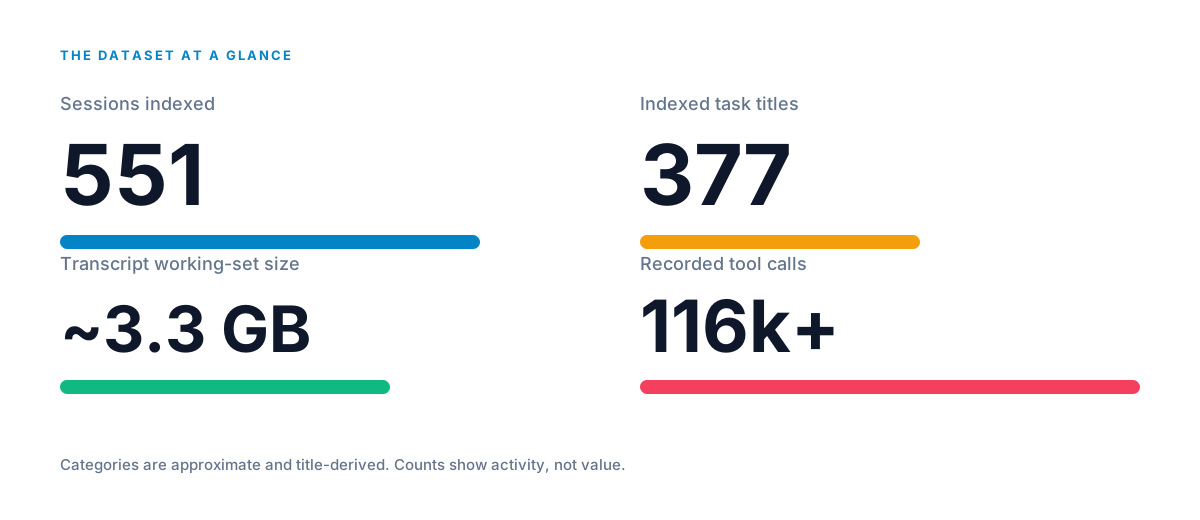
The dataset at a glance
AI work, when you actually count it, looks like disciplined volume, not mystery.
I went into this hoping AI would save me time. Instead I spent time repeating the same instructions, checking work that was supposed to be finished, and rescuing tasks that had wandered off. Sound familiar?
So I did the boring thing. For a few weeks I let an AI assistant work on my computer and keep a diary of everything it did: every command it ran, every file it looked at, every time it changed its mind. Then I counted the diary. 551 sessions. Tens of thousands of commands. About 3.3 gigabytes of record.
The question I kept coming back to was simple: what helps AI finish something properly without making me babysit it?
This article answers that question with what the diary showed me. The counts measure activity, not quality. They come from one person's setup, and I have not published the private conversations behind them.
The problem: I kept babysitting
If you use ChatGPT or another AI tool for ordinary work, you have probably met these five moments. They were everywhere in my sessions.
It forgets what you already told it. You put effort into explaining the task once. A few steps later it acts like you never said it. So you repeat yourself, and it costs you both time and the goodwill you started with.
It says it is finished when it is not. You ask for something, it announces completion, and the results are incomplete or wrong in a way you only catch by checking. Which means you are the real quality control.
It can look busy while going nowhere. Lots of commands, lots of files touched, and yet the thing you asked for still does not exist. Motion without progress is its own kind of frustrating.
Interruptions can make you start over. Your laptop goes to sleep, a connection drops, you close a tab. The work is lost or scrambled, and rebuilding feels worse than the original task.
More AI helpers can create more confusion. The moment you bring in several assistants, you gain another problem: who owns what, and who is allowed to change which file.
None of this is exotic. It is the ordinary frustration of working with AI. Once I could see the pattern, I stopped blaming myself and changed how I gave it work.
What the diary actually showed
Most of the diary was not cleverness. It was the assistant trying something, looking at the result, correcting itself, and trying again. Across the 551 sessions it ran commands more than 70,000 times and looked at a screen 2,537 times. It changed its plan 819 times and handed work to another assistant only 58 times through its built-in route.
That changed how I thought about AI. The useful version is not a machine that produces one perfect answer. It is an eager assistant that needs a clear job, regular checking, and permission to correct itself.
Where my time was actually going
The diary pointed at one answer I did not expect: a lot of the wasted effort is repetition, not compute for its own sake.
Every step of a task, the AI re-reads the description I gave it. That description gets carried along and re-read again and again. So every fuzzy, overlong instruction I wrote was being paid for many times over, not once. Shortening what I send is not just tidier. It literally means the assistant re-reads less, at every step, for the whole task.
The output side matters too. Some of my sessions were clogged with machine chatter: logs, command dumps, raw output nobody was going to read. That clutter makes each re-read longer.
I tested this idea in a separate audit of five heavy sessions. In the heaviest one, about 60.5 percent of the recorded text was machine output. I estimated that trimming it could have saved the main assistant from processing roughly 713,880 tokens. That is an estimate from a different audit, not a measured saving from the 551 sessions, but it shows how quickly the waste can build up.
These two levers, less repetition and less clutter, are where the real savings live. They exist no matter how cheap the AI gets, because they are about how much text has to be carried and re-read, not about the price of a single request.
Cheap help for the routine chores
One change had an obvious practical payoff.
Around August I started splitting work between two kinds of assistant. The small, cheap model handles the routine running around: the repetitive checks, the mechanical edits. The strongest model keeps the judgment: deciding what the goal is, planning the steps, and reviewing the result.
It is the same reason you would not pay a specialist to do the filing. I use the expensive model where judgment matters and a cheaper one for routine chores.
I should be plain about what I can prove. The local records were never designed to measure billing, so I did not measure an exact percentage or dollar saving. The audits I ran later pointed in the same direction, but they covered a different set of sessions and produced estimates rather than invoice figures. What the diary supports is the basic idea: use the strong model for judgment and the cheaper model for chores. That should save money, but I cannot honestly print a bottom line for it.
The plain fixes that cut the waste
Each of my five frustrations got a fix, and they are all things an ordinary user can try this week.
For "it forgets what you told it": write the task as if a stranger must finish it with no memory of our conversation. State what you want delivered, where it may and may not make changes, and what "done" looks like. When I deleted fuzzy instructions and repeated myself less, the assistant guessed less.
For "it says finished when it is not": agree on what you will check before you call it done. Give a specific test. If you cannot say how you will recognize success, the AI cannot either, and you become the unpaid proofreader.
For "it looks busy going nowhere": set a clear destination before you start. Ask it to stop and check in after a few attempts instead of letting it keep trying small variations forever.
For "interruptions make me start over": make the work survive a restart. A short note recording the task, the current step, and what is already proven means a new start picks up from there instead of rebuilding from zero. Check twice before deciding it has stopped. One quiet moment is not a verdict.
For "more helpers create confusion": give each helper one job and make sure the jobs do not overlap. Write down who is doing the next step.
What the numbers can and cannot claim
The numbers have limits.
The titles I grouped are approximate, based on short summaries rather than the private content behind them. The counts show activity, not whether anything valuable was produced. A long, busy session can deliver nothing; a short one can settle a whole question. This is one person's workflow on one machine, so treat the patterns as hypotheses, not universal facts. And the local records hold only my own tallies: they contain no published prompts or content, and they are not billing records.
On savings specifically, the diary shows where the waste goes: repetition and clutter. It does not give me an overall percentage or a dollar figure, because I never measured one that way.
Your move this week
You do not need my setup to try this. Paste these four questions into your next task:
- What do you think I am asking you to achieve?
- How will we know it has worked?
- What will you check before telling me it is finished?
- If the conversation stops, what note will you leave so we can continue?
If the assistant guesses less, finishes more, and needs less checking, you have built the thing I spent 551 sessions chasing. The downloadable checklist at the end turns these questions into a reusable template.
Related reading:
- How I Made Codex Subagents Measurable and Recoverable
- I Gave My AI a Team. Here Is What Happened to the Expensive Work.
- From AI Pilots to Clear Business Value
Downloadable
The practical checklist
A printable, copy-paste template for task packets, metadata indexing, recovery checkpoints, and honest token reporting.
For readers who want the exact tool names
Across 551 sessions: exec_command ran 61,215 times, write_stdin fed a running process 18,763 times, exec added 9,161 more command runs, apply_patch made 7,383 discrete file changes, view_image looked at a screen 2,537 times, update_plan re-planned 819 times, and native spawn_agent handed work to another assistant 58 times.