A local Qwen model in the normal Codex model menu, with tools, screenshots, and sensible context limits.
I already had the model weights on my Mac. The hard part was not downloading Qwen. It was making several pieces agree on one language: the format Codex sends, the format the local model server accepts, and the metadata the desktop app uses to build its model selector.
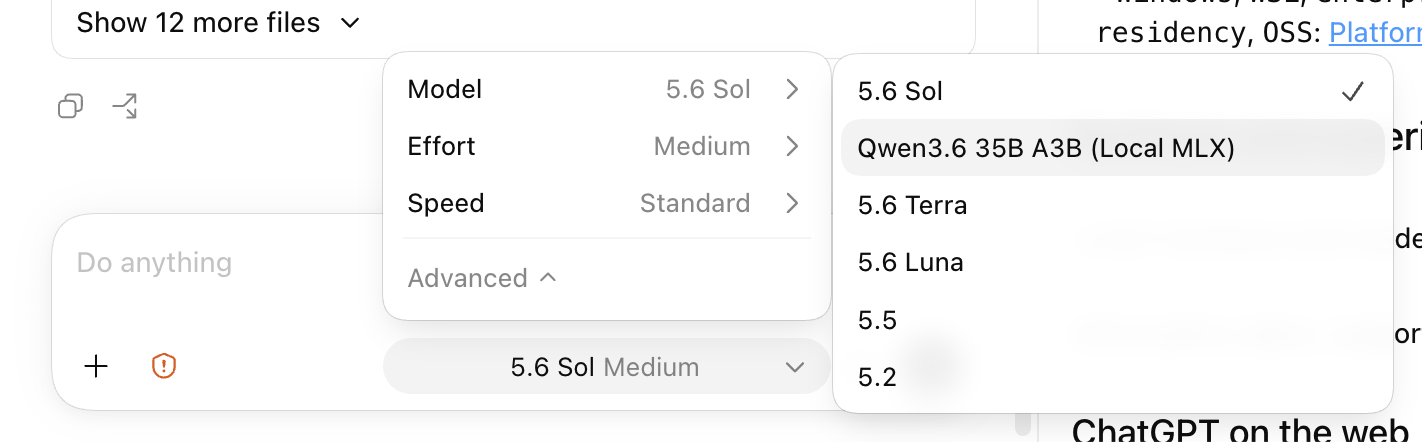
The finished setup works. Qwen appears beside the hosted models in Codex, it can read an attached screenshot, it can ask Codex to use web search and other tools, and its automatic context compression starts at a limit chosen for this local runtime.
If you want to build it rather than read the explanation first, jump to Build it yourself from a clean Mac. That section now includes every install command, configuration file, checkpoint, and removal step. The matching public example kit contains the adapter and scripts with no private paths or credentials.
I also managed to break the ChatGPT desktop installation along the way by editing the application bundle. That was the wrong approach. The supported solution is much cleaner: use Codex's user configuration and a custom model catalog.
The result
The local model appears in the normal Codex selector
The short version
There are five jobs in this setup:
- Qwen is the model doing the thinking.
- MLX lets that model run efficiently on Apple Silicon.
- MLX-VLM turns the local model into a server that accepts text and images.
- CLIProxyAPI keeps the existing authenticated hosted models available through the same local gateway.
- A small local adapter translates between Codex and the two backends, including tool names and image-valued tool results.
Codex then reads one normal configuration file and one custom model catalog. That catalog is what puts Qwen in the selector and gives it its own context rules.
flowchart TB
  C["Codex desktop app or CLI"] -->|"Responses API on localhost:8080"| A["Local adapter and router"]
  A -->|"Qwen selected"| V["MLX-VLM server on localhost:8081"]
  V --> M["Qwen3.6 35B A3B 4-bit weights in Apple unified memory"]
  A -->|"Hosted model selected"| P["CLIProxyAPI on localhost:8319"]
  P --> O["Existing authenticated OpenAI providers"]
  C --> T["Codex tools: web search, files, apps, image generation"]
  T --> A
Everything binds to 127.0.0.1, which means the services listen only on this Mac.
First, what is this Qwen model?
The model is Qwen3.6-35B-A3B, using the 4-bit MLX conversion published by the mlx-community account on Hugging Face.
That name is a lot, so here is the useful translation:
The original Qwen model card advertises a context length of 262,144 tokens. I did not use that full number locally. Long context needs a large KV cache, the model's short-term working memory for the conversation. I capped the local runtime at 163,840 tokens so it would fit reliably on this machine.
What MLX and MLX-VLM do
MLX is Apple's open-source machine-learning framework for Apple Silicon. It is designed around the Mac's unified memory, so the model can run on the same memory pool used by the CPU and GPU.
MLX-VLM is the vision-language layer. It knows how to load models that understand images and expose them through HTTP endpoints that look like familiar AI APIs.
In this setup, MLX-VLM runs on port 8081:
Local model server
The important MLX-VLM settings
The server makes local Qwen look like an API. That is necessary, but it is not enough for Codex.
Why Codex needs another layer
Codex is more than a chat box. It sends structured conversation items, tool definitions, tool calls, tool results, images, and streaming events. The protocol used here is the OpenAI Responses API.
MLX-VLM supports the broad idea, but Codex has some details that a local model server does not understand on its own. Two examples caused real problems:
- Codex groups connected tools into named namespaces. Qwen's tool parser expects ordinary function definitions.
- A tool can return an image. That image must stay an image, not become a giant base64 text string.
The local adapter on port 8080 handles those differences.
sequenceDiagram
  participant C as Codex
  participant A as Local adapter
  participant Q as Qwen through MLX-VLM
  participant T as Codex tool
  C->>A: Conversation plus namespaced tools
  A->>Q: Ordinary function definitions
  Q-->>A: Structured tool call
  A-->>C: Original namespace and tool name restored
  C->>T: Codex runs the tool
  T-->>C: Text or image result
  C->>A: Tool result
  A->>Q: Compact text plus real visual input
  Q-->>C: Final answer
For example, a Codex tool may arrive as a namespace called mcp__brave containing a function called brave_web_search. The adapter temporarily flattens that into one normal function name Qwen can call. When Qwen responds, the adapter restores the original namespace before sending the call back to Codex.
It also sends only the connected-tool groups relevant to the request. A local model does not need hundreds of unrelated definitions on every turn.
What CLIProxyAPI is doing here
CLIProxyAPI is a local gateway that exposes compatible API endpoints for authenticated command-line model providers.
I use it so the hosted OpenAI models do not disappear when Codex is pointed at the local router. The adapter makes one decision:
- if the selected model is Qwen, send the request to MLX-VLM on
8081; - otherwise, send it to CLIProxyAPI on
8319.
That gives Codex one provider URL while keeping both local and hosted models available.
The correct way to add Qwen to the Codex model selector
This was the part I initially got wrong.
I first treated the model list as if it were a hidden desktop-app feature that had to be patched inside ChatGPT.app. Changing files inside a signed macOS application invalidates the app bundle. The predictable result is an application that may stop opening and can be replaced by the next reinstall or update.
Codex already has a supported user-level route. The Codex configuration reference documents ~/.codex/config.toml, custom model providers, and model_catalog_json. The advanced configuration guide covers provider configuration in more detail.
The working user configuration is conceptually this:
model = "qwen3.6-35b-a3b-mlx"
model_provider = "local_qwen_router"
model_catalog_json = "/Users/you/path/to/codex-local-qwen/config/merged-model-catalog.json"

[model_providers.local_qwen_router]
name = "OpenAI + Local Qwen"
base_url = "http://127.0.0.1:8080/v1"
wire_api = "responses"
experimental_bearer_token = "replace-with-a-local-only-key"
requires_openai_auth = false
supports_websockets = false
Replace /Users/you with the actual home directory, and use the same local-only key in the router. wire_api = "responses" tells Codex which request format the provider accepts. CLIProxyAPI owns the hosted-model sign-in, so Codex only authenticates to the local router here.
The model catalog contains the entry Codex displays:
{
  "slug": "qwen3.6-35b-a3b-mlx",
  "display_name": "Qwen3.6 35B A3B (Local MLX)",
  "visibility": "list",
  "input_modalities": ["text", "image"],
  "context_window": 163840,
  "auto_compact_token_limit": 150000,
  "truncation_policy": {
    "mode": "tokens",
    "limit": 156000
  }
}
Three fields do most of the visible work:
visibility: "list"makes the model eligible for the selector.display_namegives it the readable label shown in the screenshot.input_modalitiestells Codex the model accepts both text and images.
- Breaks the signed macOS application bundle.
- Can stop the app from opening.
- Gets overwritten by reinstalling or updating.
- Keeps the official app untouched.
- Works for the desktop app and Codex CLI.
- Lets the local model carry its own limits and capabilities.
The catalog is read when Codex starts. After changing it, restart Codex so the selector is rebuilt from the new file.
Context compression, without the hand waving
Every turn adds more material to the conversation: messages, instructions, code, tool definitions, tool results, and sometimes images. The model cannot keep an unlimited amount in its working context.
Codex deals with long conversations by compacting older history into a shorter summary. The important detail is when that happens.
The local Qwen runtime is capped at 163,840 tokens. I set automatic compaction to start at 150,000, then set a truncation limit of 156,000. That leaves a small buffer for the next request and response.
Because auto_compact_token_limit lives only on the Qwen catalog entry, selecting Qwen uses the local threshold while hosted models keep their own catalog settings. That was the requirement, and it is much safer than setting one global number for every model.
Can local Qwen use web search and connected services?
Yes, but the wording matters.
The model itself does not secretly browse the web. Codex owns the tools. Qwen can decide to request one, Codex runs it, and then the result goes back to Qwen.
flowchart TB
  U["You ask a question"] --> Q["Qwen decides a tool would help"]
  Q --> C["Codex checks and runs the tool"]
  C --> W["Web search, file access, app, or local command"]
  W --> C
  C --> Q
  Q --> R["Qwen writes the answer using the result"]
"Connected services" is a broad label for services Codex can reach through plugins or the Model Context Protocol, usually shortened to MCP. Examples include GitHub, Google Drive, Notion, Slack, and other installed services. Availability still depends on what is installed, enabled, authenticated, and allowed in that Codex session.
The adapter exposes web and image search by default. Other large tool groups are sent to Qwen when the request clearly names them. That keeps the tool list small enough for a local model to handle reliably.
Images: understanding and generation are different
Qwen is a vision-language model, so it can inspect an image. That does not mean the Qwen model itself generates a new image.
There are two separate flows:
- Image understanding: the screenshot is sent through MLX-VLM to Qwen.
- Image generation: Codex calls a separate image-generation tool, then returns its result to the conversation.
The OpenAI vision guide makes the same basic distinction between images used as model input and image-generation capabilities.
The first image test exposed the strangest bug in the whole setup.
The failure
One small screenshot somehow became a 305,961-token prompt
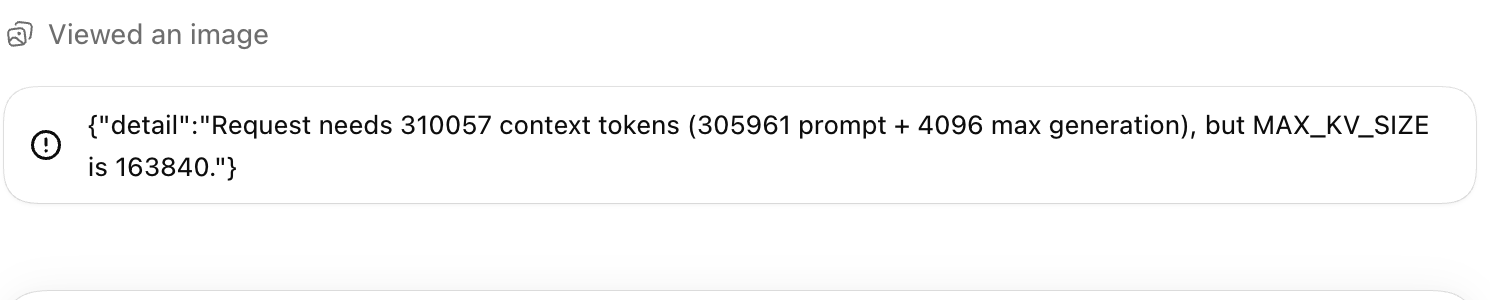
The screenshot was about 281 KB. Inside a tool result, it was represented as a base64 data URL with 374,586 text characters. MLX-VLM's Responses conversion used json.dumps() on that non-string tool output, which placed the entire image inside a text-only tool message.
That is why the error looked like a context-compression problem. It was not. Compression never had a reasonable chance to help because a single image had been turned into hundreds of thousands of text tokens in one request.
The image fix
The adapter now separates image blocks from the textual tool result:
Before
function_call_output = "data:image/png;base64,iVBORw0KGgoAAA..."

After
tool text = "[Image output attached]"
visual input = the original image data
The tool text fell from 374,586 characters to 23. The image stayed intact as visual input.
This is currently a local workaround and an upstream contribution:
- MLX-VLM issue #1760 documents the reproduction and root cause.
- MLX-VLM pull request #1761 contains the proposed general fix and is ready for review.
The local acceptance test sent the screenshot only inside function_call_output, asked Qwen to read the six-digit number visible in it, and received HTTP 200. Qwen answered with 310057, the correct number. The request used 2,383 input tokens instead of roughly 306,000.
Live acceptance proof
The same visual continuation after the fix
What the local services look like day to day
I wrapped the three local processes in small management commands and macOS user LaunchAgents. A LaunchAgent is simply a macOS way to start and supervise a process for the signed-in user.
Daily use
Start, check, inspect, stop
The start script does more than launch commands blindly. It checks whether ports 8080, 8081, or 8319 are already occupied, starts the pinned MLX model revision offline, warms it, checks each health endpoint, and stops cleanly if one stage fails.
The model itself uses about 19 GB of memory. On my 48 GB machine, macOS still had comfortable headroom during normal use, although long conversations and image-heavy work naturally add pressure.
Local cost
The model fits in 48 GB unified memory with room left for macOS

Build it yourself from a clean Mac
The earlier version of this article explained the pieces but left too much assembly to the reader. This is the complete route I would follow on a clean Apple Silicon Mac.
The commands below use the exact 4-bit Qwen snapshot I tested. At publication, the current packaged releases were MLX-VLM 0.6.8 and CLIProxyAPI 7.2.115. My original acceptance proof used MLX-VLM 0.6.5 and CLIProxyAPI 7.2.112, so I keep those tested versions visible rather than pretending the numbers are interchangeable.
Before downloading 19 GB
The exact settings in this article were tested on an Apple M5 Pro with 48 GB of unified memory and about 283 GB of free disk space. I would treat 48 GB as the comfortable target for this model and its 163,840-token cache. A Mac with less memory may still run the weights, but I have not verified this context setting there. Start with a smaller model or a much smaller --max-kv-size instead of forcing the same number.
Check the machine:
uname -m
system_profiler SPHardwareDataType | grep -E "Chip|Memory"
df -h "$HOME"
The first command should print arm64. Leave at least 25 GB free for the model, plus working room for logs, downloads, macOS, Codex, and the model's cache.
Checkpoint 0
The Mac is suitable for this exact guide
1. Install the basic command-line tools
Apple's command-line developer tools provide Git and the compiler support some packages expect:
xcode-select --installIf brew --version fails, install Homebrew:
/bin/bash -c "$(curl -fsSL https://raw.githubusercontent.com/Homebrew/install/HEAD/install.sh)"Then install uv, jq, and CLIProxyAPI:
brew install uv jq cliproxyapiuv installs and isolates Python command-line tools. jq reads the small JSON configuration files used by the start script. Homebrew's cliproxyapi package supplies the hosted-model gateway.
Install MLX-VLM and the Hugging Face download command in isolated Python environments:
uv tool install --python 3.13 mlx-vlm
uv tool install --python 3.13 huggingface_hub
uv tool update-shell
Open a new Terminal window, then verify the commands instead of assuming the shell found them:
uv --version
jq --version
mlx_vlm.server --help
hf --help
cliproxyapi --help
codex --version
If mlx_vlm.server or hf is missing, ~/.local/bin is probably not on PATH yet. Opening a new Terminal after uv tool update-shell normally fixes that.
2. Download and verify Qwen
Create a predictable model directory, then pin the download to the revision used for this article:
mkdir -p "$HOME/Models/Qwen3.6-35B-A3B-4bit"

hf download mlx-community/Qwen3.6-35B-A3B-4bit \
  --revision 38740b847e4cb78f352aba30aa41c76e08e6eb46 \
  --local-dir "$HOME/Models/Qwen3.6-35B-A3B-4bit"
The repository is public and is not gated. The download can be restarted with the same command if it is interrupted.
Check the files and size:
test -f "$HOME/Models/Qwen3.6-35B-A3B-4bit/config.json"
test -f "$HOME/Models/Qwen3.6-35B-A3B-4bit/model.safetensors.index.json"
du -sh "$HOME/Models/Qwen3.6-35B-A3B-4bit"
The directory should be roughly 19 GB and contain four .safetensors weight files. If config.json is missing, the model download is not complete.
3. Prove Qwen works without Codex
This isolates model problems from every routing and Codex problem that follows:
mlx_vlm.generate \
  --model "$HOME/Models/Qwen3.6-35B-A3B-4bit" \
  --prompt "Reply with exactly QWEN_DIRECT_OK" \
  --max-tokens 32 \
  --temperature 0
Do not continue until the answer contains QWEN_DIRECT_OK. The first run may spend time loading about 19 GB of weights into unified memory.
You can also prove vision before involving Codex:
mlx_vlm.generate \
  --model "$HOME/Models/Qwen3.6-35B-A3B-4bit" \
  --image /absolute/path/to/a-small-image.png \
  --prompt "Describe one visible detail in this image." \
  --max-tokens 100 \
  --temperature 0
4. Start MLX-VLM as an API and test it directly
Run this in its own Terminal window:
mlx_vlm.server \
  --model "$HOME/Models/Qwen3.6-35B-A3B-4bit" \
  --host 127.0.0.1 \
  --port 8081 \
  --max-tokens 4096 \
  --max-kv-size 163840 \
  --kv-bits 8 \
  --kv-quant-scheme uniform \
  --vision-cache-size 8 \
  --log-level INFO
In a second Terminal, wait for the model list to respond:
curl -fsS http://127.0.0.1:8081/v1/models | jq .Then make a direct Responses request:
curl -fsS http://127.0.0.1:8081/v1/responses \
  -H 'Content-Type: application/json' \
  -d "$(jq -n \
    --arg model "$HOME/Models/Qwen3.6-35B-A3B-4bit" \
    '{model:$model,input:"Reply with exactly QWEN_SERVER_OK",stream:false}')" \
  | jq .
At this point there is still no Codex, no adapter, and no CLIProxyAPI. A failure here belongs to the model or MLX-VLM layer.
5. Install the public adapter kit
The small adapter is real source code, not pseudocode. I published the path-neutral copy with the article:
git clone https://github.com/Rajeev-SG/rajeevg.com.git
cd rajeevg.com/examples/codex-local-qwen

cp config/settings.example.json config/settings.json
cp config/cliproxyapi.example.yaml config/cliproxyapi.yaml
chmod +x scripts/*.sh
Open config/settings.json and replace the example model path:
{
  "model_path": "/Users/your-name/Models/Qwen3.6-35B-A3B-4bit",
  "model_alias": "qwen3.6-35b-a3b-mlx",
  "context_length": 163840,
  "max_output_tokens": 4096
}
Check that the JSON is valid and points at the model:
jq . config/settings.json
MODEL_PATH="$(jq -r '.model_path' config/settings.json)"
test -f "$MODEL_PATH/config.json"
The adapter itself is app/adapter.py. It uses only Python's standard library. Its two important jobs are flattening Codex's namespaced tool definitions for Qwen and keeping an image returned by a tool as visual input.
6. Configure and sign in to CLIProxyAPI
The included config/cliproxyapi.yaml is deliberately small:
host: "127.0.0.1"
port: 8319
auth-dir: "~/.cli-proxy-api"
api-keys:
  - "sk-local-codex"
debug: false
logging-to-file: true
request-retry: 1
routing:
  strategy: "fill-first"
The value sk-local-codex is a local password shared by CLIProxyAPI, the adapter, and Codex. It is not an OpenAI API key. You can change it, but the same value must be used in all three places.
Sign CLIProxyAPI into the hosted Codex models:
cliproxyapi \
  --config "$PWD/config/cliproxyapi.yaml" \
  --codex-login
Finish the normal browser sign-in. The account file is stored under ~/.cli-proxy-api. This is why the Codex provider shown later uses the local bearer key and requires_openai_auth = false: CLIProxyAPI already owns the hosted-provider sign-in.
Start CLIProxyAPI temporarily in another Terminal:
cliproxyapi --config "$PWD/config/cliproxyapi.yaml"Check it from a second Terminal:
curl -fsS http://127.0.0.1:8319/v1/models \
  -H 'Authorization: Bearer sk-local-codex' \
  | jq '.data[] | .id'
You should see hosted model IDs. If the list is empty or authentication fails, repeat --codex-login with the same configuration file.
7. Start the complete local route
Stop the two temporary foreground servers with Control-C. From the example-kit directory, start all three services in the correct order:
./scripts/start.sh
./scripts/status.sh
The start script checks the three ports, starts MLX-VLM, waits for it, starts CLIProxyAPI, waits again, and finally starts the adapter. Its final response should look like this:
{"status":"ok","mlx_vlm":true,"cliproxyapi":true}Logs live in the kit's logs/ directory. Stop the route with:
./scripts/stop.shI use macOS LaunchAgents on my own machine, but they are optional. The included scripts are easier to inspect, debug, move, and remove on a first installation. Once the manual route is reliable, wrapping those same three commands in LaunchAgents is an operational convenience rather than a new part of the architecture.
8. Build a model catalog without losing hosted models
model_catalog_json replaces the catalog Codex reads at startup. A file containing only Qwen would therefore hide the hosted entries. The kit solves that by asking the installed Codex binary for its bundled catalog and appending Qwen:
uv run --python 3.13 --no-project \
  python scripts/merge_model_catalog.py

jq '.models[] | {slug, display_name}' \
  config/merged-model-catalog.json
The output should include qwen3.6-35b-a3b-mlx and the hosted models. Rerun this merge after updating Codex so a stale copied catalog does not hide newer hosted entries.
The Qwen entry alone contains:
"context_window": 163840,
"auto_compact_token_limit": 150000,
"truncation_policy": {"mode": "tokens", "limit": 156000}
That is how the compression threshold applies only when Qwen is selected.
9. Add the provider to Codex
Back up the current configuration:
cp "$HOME/.codex/config.toml" \
  "$HOME/.codex/config.toml.before-local-qwen"
Merge the following into ~/.codex/config.toml. Use the actual absolute path to the example kit; TOML should not contain the literal /Users/you placeholder.
model = "qwen3.6-35b-a3b-mlx"
model_provider = "local_qwen_router"
model_catalog_json = "/Users/your-name/Code/rajeevg.com/examples/codex-local-qwen/config/merged-model-catalog.json"

[model_providers.local_qwen_router]
name = "Hosted models + local Qwen"
base_url = "http://127.0.0.1:8080/v1"
wire_api = "responses"
experimental_bearer_token = "sk-local-codex"
requires_openai_auth = false
supports_websockets = false
Preserve unrelated settings already in the file. Never edit anything inside ChatGPT.app.
Quit Codex completely and reopen it. The desktop app and CLI read the catalog at startup, so changing the JSON while Codex remains open will not rebuild the selector.
10. Test each layer separately inside Codex
Do these as separate checks. A single successful chat does not prove the whole setup.
After each test, inspect logs/adapter.log. Qwen requests should say route=mlx_vlm; hosted selections should say route=cliproxyapi.
Web search, connected services, and image generation remain Codex tools. Qwen can request those tools because the adapter presents their definitions in a form it can use. Qwen's own visual ability is image understanding, not image generation.
Troubleshooting by symptom
| Symptom | Check |
|---|---|
mlx_vlm.server is missing | Open a new Terminal after uv tool update-shell, then check that ~/.local/bin is on PATH. |
| Model loading fails | Rerun the pinned hf download, confirm config.json, and inspect logs/mlx-vlm.log. |
| A port is already used | Run lsof -nP -iTCP:8080 -iTCP:8081 -iTCP:8319 -sTCP:LISTEN, then stop only the process you recognise. |
| CLIProxyAPI shows no hosted models | Repeat --codex-login with the same config and inspect logs/cliproxyapi.log. |
| Qwen is absent from the selector | Rebuild the merged catalog, check the absolute model_catalog_json path, then quit and reopen Codex. |
| Qwen appears but requests fail | Confirm ./scripts/status.sh reports all three services and that the local key matches in both configs. |
| An image returned by a tool explodes the context | Keep the adapter normalisation until MLX-VLM PR #1761 is released and verified locally. |
| Memory pressure rises sharply | Stop the route, lower context_length and --max-kv-size, or use a smaller model. |
Updating, stopping, and removing it
Update the installed programs with:
uv tool upgrade mlx-vlm
brew upgrade cliproxyapi
After a Codex update, rebuild merged-model-catalog.json. After an MLX-VLM update, repeat direct text, image, and image-valued tool-result tests before removing the adapter workaround.
To remove the setup:
- Run
./scripts/stop.sh. - Restore the backed-up
~/.codex/config.toml, or remove only the provider, model, and catalog lines added above. - Delete the example-kit directory if you no longer need it.
- Delete
$HOME/Models/Qwen3.6-35B-A3B-4bitonly if you also want to recover the model's 19 GB of disk space.
The public example kit is the source of truth for the adapter and helper scripts. It contains placeholders and local-only example keys, not my paths, authentication files, or private screenshots.
What was actually verified
The local test suite and live checks covered:
For the upstream MLX-VLM change, the focused converter and endpoint tests passed, the full server suite reported 253 passing tests, formatting checks passed, and the live Codex plus Qwen run completed successfully.
The limits I would keep in mind
- A 35B local model still needs a capable Mac. The 4-bit files are about 19 GB before working memory.
- My 163,840-token runtime limit is lower than the model card's theoretical maximum because reliable local operation matters more than the largest possible number.
- Tool use depends on Codex, the adapter, and the installed services. It is not a property of Qwen alone.
- Image generation is a separate tool. Qwen's visual ability is image understanding.
- The MLX-VLM image-output fix is still under upstream review. The local adapter keeps the workaround until a released version includes it.
- Local inference keeps model processing on the Mac, but web search and connected services can still send the relevant request to their external service.
What I learned
The surprising bit was not that Qwen could run on a Mac. MLX already makes that part quite approachable.
The real work was in the joins between systems. A model can be perfectly healthy while the surrounding protocol is wrong. A screenshot can be tiny as an image and enormous as text. A model selector can look like an app feature while actually being driven by a supported configuration file outside the app.
If I were starting again, I would treat the setup as four separate questions:
- Can the model run?
- Can it speak the API Codex expects?
- Can it participate in Codex's tool loop?
- Can Codex describe it correctly in the model catalog?
That separation would have saved a lot of time, and one desktop-app reinstall.
Sources
- Apple MLX repository
- MLX-VLM repository
- CLIProxyAPI repository
- CLIProxyAPI macOS quick start
- CLIProxyAPI Codex sign-in
- Qwen3.6-35B-A3B model card
- 4-bit MLX conversion used here
- Public adapter and configuration kit
- Codex configuration reference
- Codex advanced configuration
- Codex models guide
- OpenAI Responses API reference
- OpenAI image and vision guide
- MLX-VLM issue #1760
- MLX-VLM pull request #1761
All local measurements and screenshots in this article come from the Apple M5 Pro, 48 GB setup described above. Software versions in the original acceptance proof were MLX 0.32.0, MLX-VLM 0.6.5, CLIProxyAPI 7.2.112, and Codex CLI 0.146.0-alpha.9.2. The clean-Mac walkthrough was checked against the current packaged releases available on 3 August 2026: MLX-VLM 0.6.8 and CLIProxyAPI 7.2.115.